Skip to product information
1 of 6

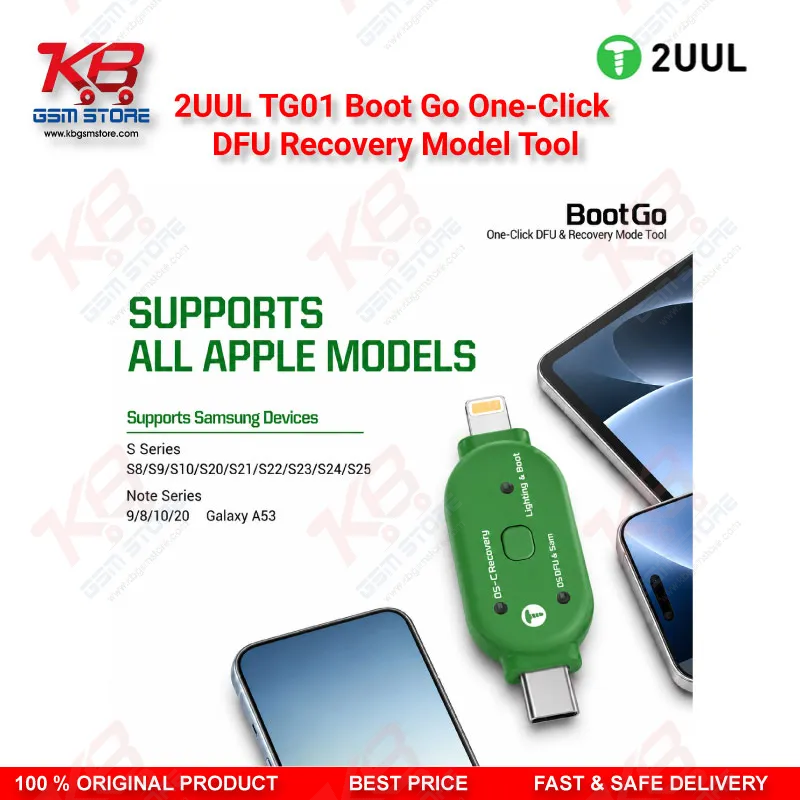
2UUL TG01 Boot Go One-Click DFU & Recovery Mode Tool for iPhone iPad

2UUL TG01 Boot Go One-Click DFU & Recovery Mode Tool for iPhone iPad

Regular price Rs.3,000.00 PKR
Regular price Sale price Rs.3,000.00 PKR
Sale Sold out
Shipping calculated at checkout.
Quantity

The 2UUL TG01 Boot Go puts any Apple device into DFU Mode or Recovery Mode with a single button press, removing the guesswork of manual button-combo timing. Built with dual Lightning and USB-C connectors, it works across a wide range of iPhone, iPad, and iPod models without swapping cables mid-job. Technicians use it for firmware restore, jailbreak prep, engineering diagnostics, and recovering a dead phone that refuses to boot normally. At just 20 x 8 x 30mm and 5g, it slides into a repair kit or pocket and stays ready for the next bench job. A dependable pick for anyone running iTunes, Finder, or 3uTools restores on a busy repair counter.

SKU:MST-FLASHING-DEVICE-27

⚖️ Weight: 0.05 kg

  • Safe & Secure Payment
  • Fast Delivery
  • WhatsApp Support
View full details

Getting an iPhone or iPad into DFU Mode by hand means hitting Volume Up, Volume Down, and Power in an exact sequence within a narrow window, and one mistimed press sends you back to the start — a frustration every GSM technician knows well when a customer's dead phone sits on the bench with the clock running. The 2UUL TG01 Boot Go removes that guesswork entirely: you connect it to the device through its built-in Lightning or USB-C connector, press the single onboard button, and the tool forces the phone into DFU Mode, Recovery Mode, or the OS DFU & SAM state your workflow needs. This matters most on devices that hang on logo, loop endlessly after a failed update, or go dead after flash — situations where manual button combos become unreliable because the display gives you no feedback to time against. Because the TG01 carries both Lightning and USB-C in one compact body, you skip the cable-swapping that slows down a repair queue mixing older Lightning iPhones with newer USB-C iPhone and iPad models; you plug in, click, and the connected computer or flashing box immediately recognizes the device in the correct boot state. This tool sits at the entry point of the iOS repair workflow: before you can run a firmware restore in iTunes or Finder, prep a device for jailbreak-based unlocking, or hand a board over for ISP-level diagnostics, you need the phone parked in a stable, recognized boot mode — and that's exactly what the Boot Go delivers without touching the device's physical buttons at all. For a dead phone with a damaged power or volume button, or a board where those buttons no longer register due to a hardware fault, the TG01 becomes the only practical way to reach DFU Mode, since it bypasses the button flex cable entirely and communicates through the charging port. Technicians handling network issue cases, corrupted software, or a device stuck after a bad update use the tool the same way: connect, force the boot mode, then run the restore or diagnostic software from there. The 5V-2A input keeps power delivery within safe limits for the connected device, and the compact 20 x 8 x 30mm footprint with a 5g net weight means it rides along in a tool pouch without adding bulk, unlike bulkier engineering boxes that need a dedicated case. Novice technicians benefit from the plug-and-play design just as much as senior repair engineers, since there's no software installation or driver setup on the tool's side — the complexity lives in the phone's boot process, and the TG01 handles that complexity internally. On a busy repair counter juggling multiple customer devices, the time saved by not re-attempting a missed button sequence adds up across a full day's workload, and the reliability of a single-click trigger reduces the chance of a customer walking away thinking their board took damage from a failed manual attempt. Repair shops that regularly deal with firmware-level issues, jailbreak requests, or engineering-mode diagnostics find the Boot Go earns its place in the toolkit quickly, since it removes one of the most repetitive and error-prone manual steps in iOS repair work. Pair it with your existing test boxes, ISP tools, and diagnostic software, and the TG01 becomes the fast, repeatable first step that gets a problem device into a state your other tools can actually work with.

Key Features

  • One-click entry into DFU Mode, Recovery Mode, and OS DFU & SAM Mode
  • Dual Lightning and USB-C connectors in a single tool body
  • No manual button-combo timing required
  • Plug-and-play operation with no driver or software setup
  • Compact 20 x 8 x 30mm body weighing approximately 5g
  • Works alongside iTunes, Finder, and 3uTools-based restore workflows
  • Bypasses damaged power or volume buttons during DFU entry
  • Fits directly into a technician's existing repair toolkit without extra case space

Specifications

Brand Entity 2UUL
Product Entity TG01 Boot Go One-Click DFU & Recovery Mode Tool
Technology Entity DFU (Device Firmware Update) Mode, Recovery Mode boot switching
Compatible Device Entities Apple iPhone, iPad, iPod touch (Lightning and USB-C models)
Repair Process Entity iOS firmware flashing, system restore, jailbreak preparation, board-level diagnostics
Industry Entity Mobile phone repair and GSM repair industry, Pakistan

Compatible Devices


Apple iPhone, iPad, and iPod touch models equipped with a Lightning or USB-C port

Common Repair Uses


Forcing DFU Mode or Recovery Mode entry for firmware restore, recovering a dead phone or one hanging on logo after a failed update, preparing a device for jailbreak-based unlocking, supporting ISP and engineering-mode diagnostics, and restoring devices that go dead after flash where the physical buttons are damaged or unreliable

FAQ

What is the product name?
The product name is 2UUL TG01 Boot Go One-Click DFU & Recovery Mode Tool.
What is the brand of this product?
The brand of this product is 2UUL.
What is the model of this product?
The model of this product is TG01.
What is this product used for?
This product is used for forcing Apple devices into DFU Mode or Recovery Mode with a single button press, without manual button combinations.
Which devices are compatible with this product?
This product is compatible with Apple iPhone, iPad, and iPod touch models that use a Lightning or USB-C port.
Who should use this product?
This product is suitable for mobile repair technicians, repair shops, service centers, and professional iOS repair users.
Does the TG01 work on both Lightning and USB-C iPhone models with the same tool?
Yes, the TG01 has both Lightning and USB-C connectors built into one body, so it handles older and newer iPhone and iPad models without swapping tools.
Can the TG01 put a dead phone with a broken power button into DFU Mode?
Yes, the tool triggers DFU Mode through the charging port connection rather than the physical buttons, so it works even when the power or volume button flex is damaged.