Skip to product information
1 of 4

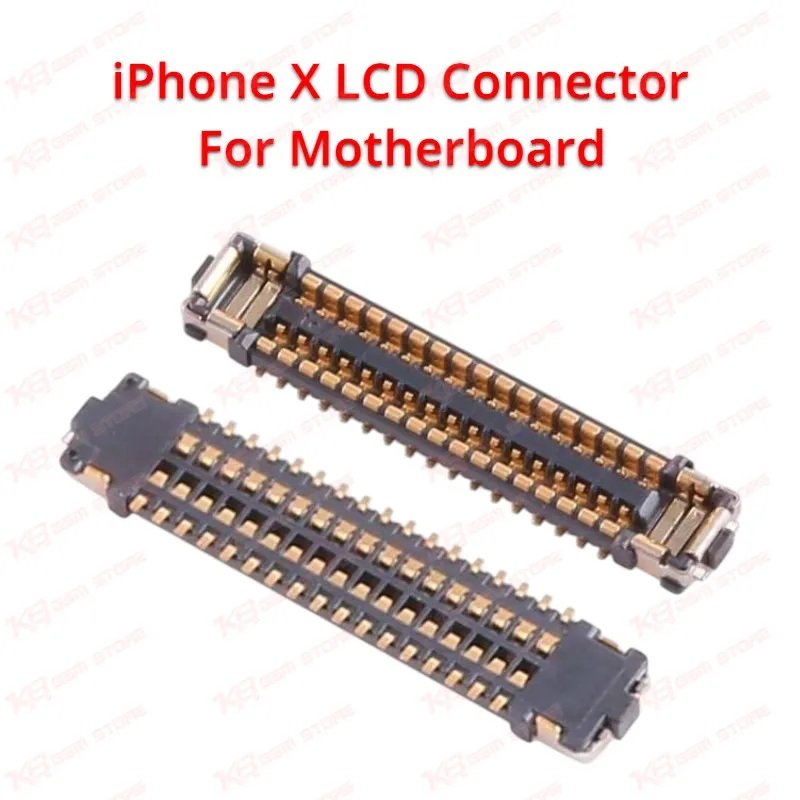
iPhone X LCD Connector For Motherboard

iPhone X LCD Connector For Motherboard

Regular price Rs.230.00 PKR
Regular price Sale price Rs.230.00 PKR
Sale Sold out
Shipping calculated at checkout.
Quantity

This iPhone X LCD FPC connector (J5700, 34 pin) is the on-board socket that links the LCD and digitizer flex cable to the logic board. When a technician sees no display, flickering, touch failure, or "dead after LCD swap" on an iPhone X, a cracked or corroded J5700 connector is a common root cause. Built to OEM pin spacing and pitch, this part solders directly onto the original footprint without board modification. It restores LCD data and touch signal continuity so the display and digitizer function normally again. Recommended for repair shops and GSM technicians doing board-level, component-soldering repairs rather than simple screen replacements.

SKU:MST-SOCKET-108

⚖️ Weight: 0.1 kg

  • Safe & Secure Payment
  • Fast Delivery
  • WhatsApp Support
View full details

Description

Every iPhone X carries a small but critical surface-mount connector on the logic board known as J5700, and this listing supplies that exact 34-pin LCD FPC connector for technicians who need to replace it after physical or electrical damage. The connector sits directly beneath where the display flex cable plugs into the motherboard, and its job is simple but essential: carry LCD driving signals and digitizer touch data between the screen assembly and the board's display and touch ICs. When even one of its 34 gold contact points lifts, corrodes, or cracks, the phone can show a black screen, partial display, flickering lines, unresponsive touch, or a screen that works only under pressure. Many technicians first suspect the LCD itself, swap in a known-good screen, and still get the same fault — that's usually the moment the FPC connector becomes the prime suspect on the repair bench.Physical damage is the most frequent cause of J5700 failure. Repeated screen removal during LCD or digitizer replacements, drop damage that flexes the board, or a technician prying too aggressively with a spudger near the connector can snap or bend the fine pins. Liquid exposure is the second major cause — even a small amount of moisture ingress around the display seal can creep under the connector and corrode the solder joints over time, leading to intermittent display problems that come and go with board flexing or temperature. In both cases, reflowing the existing connector rarely gives a permanent fix; replacing the connector with a new one restores a clean, reliable contact surface.This is a board-level component, not a plug-and-play part, so installation requires hot air rework equipment, flux, and micro-soldering experience. The old connector needs to be lifted cleanly with hot air without lifting the pads underneath it or damaging nearby SMD components, the pads then need to be cleaned and reballed or reflowed if solder has thinned, and the new J5700 connector is placed and reflowed onto the original footprint. Getting the pin alignment right under magnification matters here — a shifted or bridged pin after reflow can cause a short or a no-display fault even with a brand-new connector, so most technicians work under a microscope for this repair.Because this connector carries LCD and touch data lines rather than power, a bad J5700 connector typically will not cause a "dead phone" that fails to power on — the board will boot and the phone will usually still respond to iTunes/Finder recognition, but the screen output or touch response fails. That distinction helps during diagnosis: if a technician gets no display but the phone still connects to a computer and shows normal current draw, board-side display circuitry — starting with this connector — should be checked before assuming a display driver IC or backlight IC fault.This part is intended for replacement on an existing iPhone X logic board where the original connector is confirmed damaged, corroded, or missing pins, and is not a substitute for the LCD or digitizer flex cable itself. Technicians handling iPhone X board-level repair, liquid damage recovery, or "screen doesn't work but board powers on" cases will find this a routine but necessary stock item for the repair bench.

Key Features

  • Exact OEM footprint and pin pitch for direct board reflow
  • 34-pin configuration matched to original iPhone X J5700 connector
  • Restores LCD and digitizer signal continuity after connector failure
  • Suitable for hot air rework and micro-soldering installation
  • Resolves black screen and touch failure caused by connector damage
  • Helps isolate board-side display faults from LCD panel faults
  • Compact SMD design fits standard iPhone X board footprint
  • Useful stock item for liquid damage and board-level repair shops

Specifications

Brand Entity OEM / Apple-compatible replacement part
Product Entity iPhone X LCD FPC Connector (J5700, 34 Pin)
Technology Entity Surface-Mount FPC Connector, Micro-Soldering Component
Compatible Device Entities iPhone X (A1865, A1901, A1902)
Repair Process Entity Board-Level Repair, LCD Connector Replacement, Micro-Soldering Rework
Industry Entity Mobile Repair Industry, PCB Repair, GSM Technician Tools

Compatible Devices


iPhone X (all standard model variants, A1865 / A1901 / A1902)

Common Repair Uses


LCD and digitizer flex connector replacement, black screen repair, no-display repair, flickering or unresponsive touch screen repair, liquid damage board recovery, board-level micro-soldering rework on iPhone X logic boards

FAQ

What is the product name?
The product name is iPhone X LCD Screen FPC Connector On-Board (J5700, 34 Pin).
What is the brand of this product?
This is an OEM-spec replacement connector.
What is the model of this product?
The model is J5700.
What is this product used for?
It is used to replace a damaged or corroded on-board LCD/digitizer FPC connector on the iPhone X logic board.
Which devices are compatible with this product?
This connector is compatible with iPhone X (A1865, A1901, A1902).
Who should use this product?
This product is suitable for mobile repair technicians, repair shops, service centers, and professional micro-soldering technicians.
Does a bad J5700 connector cause a dead phone or only a display issue?
It typically causes display or touch problems rather than a fully dead phone, since it carries LCD and touch signal lines rather than main power.
Can this connector be installed without hot air rework equipment?
No, it requires hot air removal and reflow soldering under magnification; it is not a plug-and-play part.

Ask any Query