Skip to product information
1 of 4

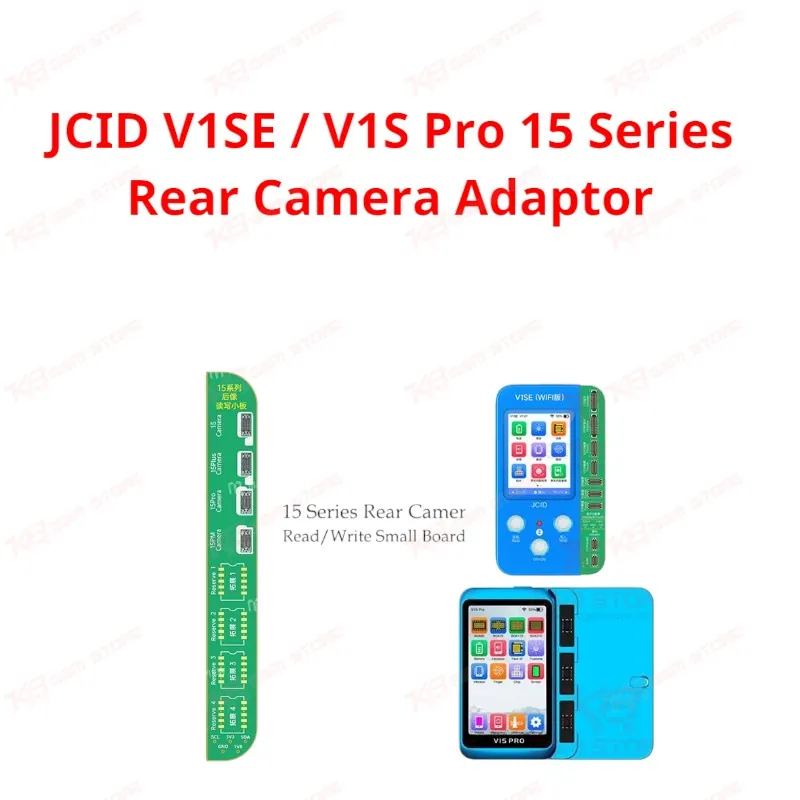
JCID V1SE / V1S Pro 15 Series Rear Camera Adaptor

JCID V1SE / V1S Pro 15 Series Rear Camera Adaptor

Regular price Rs.4,000.00 PKR
Regular price Sale price Rs.4,000.00 PKR
Sale Sold out
Shipping calculated at checkout.
Quantity

This JCID adaptor plugs into your V1SE or V1S Pro programmer and lets you read and write rear camera data on iPhone 15 series boards. When a technician swaps in a non-original rear camera, the phone throws a pop-up warning or mismatched camera code — this board pairs the new camera data to the logic board and clears that error. No donor camera chip transplant, no microsoldering on the camera FPC itself. You get a fast, board-level fix for a repair that used to eat up bench time. Built for shops running high camera-replacement volume on iPhone 15 hardware.

SKU:MST-SOLDERING-ACCESSORIES-320

⚖️ Weight: 0.01 kg

  • Safe & Secure Payment
  • Fast Delivery
  • WhatsApp Support
View full details

Description

Rear camera repair on the iPhone 15 series creates a specific headache: swap in an aftermarket or donor camera module without matching the original data, and the phone throws a pop-up window or the camera straight up refuses to calibrate properly. Apple ties camera hardware to board-level data through its pairing system, so a mismatched camera code turns a simple part swap into a customer complaint about blurry photos or a persistent warning screen. The JCID V1SE/V1S Pro 15 Series Rear Camera Adaptor exists to close that gap. You connect this board to your JCID V1SE or V1S Pro programmer, hook it into the rear camera FPC contact points on the iPhone 15 logic board, and run the read/write function through the programmer's interface. The adaptor pulls the existing camera data off the board (or reads a donor's data), then writes it back so the installed camera pairs correctly. This solves the "unable to verify this iPhone has a genuine camera" pop-up and clears the photography focus and cinematic mode lag issues that show up when a non-original rear camera goes in without proper data matching. For a Pakistani repair shop, this tool changes how you approach a dead rear camera. Instead of quoting a customer for a full logic board swap or refusing the repair outright because you can't source a data-matched OEM camera, you take a working donor camera or a compatible aftermarket unit, run it through this adaptor, and pair it to the board. That's the difference between turning away a "camera issue" job and closing it same-day. Shops doing iPhone 15 board-level work — not just screen and battery jobs — need this in their JCID toolkit alongside their existing camera adaptors for older iPhone generations. The adaptor is purpose-built for the iPhone 15 series specifically. It sits in the same family as JCID's 12-15PM front and rear camera read/write modules, but this board is dedicated to iPhone 15 rear camera pairing, so you're not stuck configuring a generic multi-gen tool for a single job. Plug it in, select the correct mode on your V1SE/V1S Pro screen, and run the read/write cycle. This isn't a standalone device — it's an add-on board that extends what your V1SE or V1S Pro programmer can already do. If you're running either programmer on your bench and taking in iPhone 15 rear camera jobs, this adaptor is the missing piece between "camera won't pair" and "camera fixed." It fits directly into the JCID ecosystem your shop is likely already using for True Tone, Face ID, and battery data repair, so there's no new software to learn — just a new function unlocked on hardware you already run. For technicians building out a full camera repair workflow, pair this with your existing front camera adaptor and LiDAR read/write boards for older iPhone generations, so your bench covers the full range of iPhone camera and radar pairing jobs without gaps.

Key Features

• Reads and writes rear camera data directly on iPhone 15 series boards
• Clears non-genuine camera pop-up warnings after a camera swap
• Fixes out-of-focus photography caused by mismatched camera data
• Resolves cinematic mode lag tied to non-original rear cameras
• Plugs directly into V1SE and V1S Pro programmers — no extra host needed
• Board-level fix, so you skip full logic board replacement for camera pairing faults
• Fits into your existing JCID camera and radar repair workflow
• Built for high-volume iPhone 15 rear camera repair on a professional bench

Specifications

Brand Entity JCID
Product Entity Rear Camera Read & Write Adaptor
Technology Entity Camera data pairing / EEPROM read-write
Compatible Device Entities iPhone 15, iPhone 15 Plus, iPhone 15 Pro, iPhone 15 Pro Max
Repair Process Entity Rear camera pairing and calibration repair
Industry Entity Mobile repair, GSM board-level repair

Compatible Devices

iPhone 15 series (iPhone 15, iPhone 15 Plus, iPhone 15 Pro, iPhone 15 Pro Max)

Common Repair Uses

Rear camera replacement pairing, clearing "non-genuine camera" pop-up warnings, fixing out-of-focus photography and cinematic mode lag caused by unmatched rear camera data

FAQ

What is the product name?
The product name is the JCID V1SE/V1S Pro 15 Series Rear Camera Read & Write Adaptor.
What is the brand of this product?
The brand of this product is JCID.
What is this product used for?
This product is used to read and write rear camera data on iPhone 15 series boards so a replaced rear camera pairs correctly with the logic board.
Which devices are compatible with this product?
This product is compatible with iPhone 15, iPhone 15 Plus, iPhone 15 Pro, and iPhone 15 Pro Max.
Who should use this product?
This product is suitable for mobile repair technicians, repair shops, service centers, and professional users working on iPhone 15 board-level repairs.
Does this adaptor work without a JCID programmer?
No, this adaptor connects to and functions through a JCID V1SE or V1S Pro programmer — it does not operate as a standalone device.
Will this fix the pop-up warning after a rear camera swap on iPhone 15?
Yes, running the read/write function through this adaptor pairs the new camera data to the board, which clears the non-genuine camera pop-up caused by unmatched camera data.