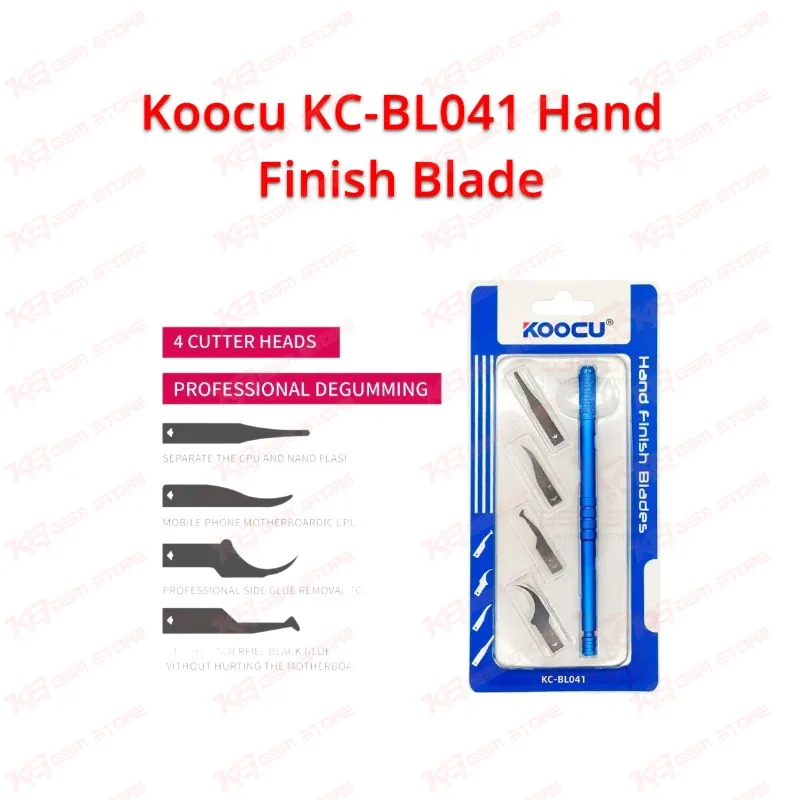
When you're prepping a board for chip removal or getting it ready for reballing, the glue underneath the CPU or NAND flash is usually what slows you down, and the KC-BL041 set from Koocu is built around solving exactly that. Instead of one generic blade trying to do every job, you get four models, each shaped for a specific step in the process. Model S handles the separation between CPU and NAND flash, giving you a thin enough edge to slide under the chip without lifting pads or cracking the substrate. Model E is your go-to when you're cleaning IC or CPU glue residue straight off the motherboard surface, which is a step most Pakistani technicians know as "chip clean before jumper lagana" on boards that need a rework after a dead-after-flash case. Model X gives you a sharper, more refined edge for professional-grade edge glue removal, the kind of detail work that matters when a customer's board has fine-pitch components close to the work area. Model Y is built specifically to cut through the black underfill glue without hurting the motherboard layers underneath it, which is the exact scenario you run into during BGA rework or CPU reball jobs where one slip can turn a simple hardware fault into a burned trace. The handle itself isn't an afterthought. Koocu runs it through a sandblasting process that produces a fine, frosted texture across the alloy surface, then applies a current to the metal in a point solution to form a colored oxide layer on top. That combination gives you a non-slip surface that holds up over hours of scraping and prying, unlike bare metal handles that get slippery once your hands warm up on the bench. The manual processing on the cutting edge is what keeps this set relevant after the first few uses — each blade responds well to re-grinding, so you're sharpening rather than replacing when the edge starts to dull. For a workshop running multiple boards a day, that translates into lower tool turnover and fewer mid-job tool changes. This isn't a device-specific tool, so it doesn't matter whether the board in front of you is Qualcomm-based, MediaTek-based, or something else entirely — the blade set works on the PCB itself, not on any particular chipset's layout. That makes it equally useful whether you're working a network issue board, a charging issue motherboard, or a unit that came in with a boot loop issue after a failed IC change. Technicians running ISP, eMMC, or UFS-based repair workflows will find this set fits naturally alongside their existing hot air station and microscope setup, since glue removal is almost always the step right before or right after reflow work. If your bench already runs soldering stations, PCB holders, and reballing kits, the KC-BL041 slots into that same toolkit without needing extra training — the four blade shapes are intuitive enough that most technicians pick the right one on sight once they know what each letter stands for. For a repair shop handling volume, having a dedicated blade for each glue-removal scenario cuts down on hesitation and reduces the risk of using the wrong edge on a delicate board.