Skip to product information
1 of 5

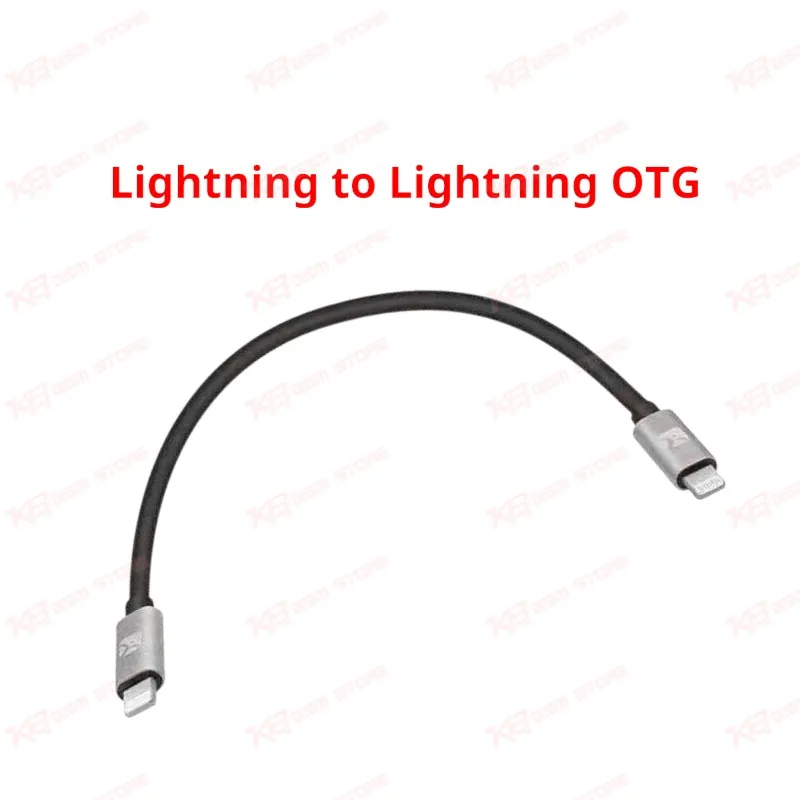
Lightning to Lightning OTG IOS Adapter Line for iPhone iPad Data Migration Cab

Lightning to Lightning OTG IOS Adapter Line for iPhone iPad Data Migration Cab

Regular price Rs.1,500.00 PKR
Regular price Sale price Rs.1,500.00 PKR
Sale Sold out
Shipping calculated at checkout.
Quantity

This Lightning to Lightning OTG cable connects two iOS devices directly for one-step data migration between an old iPhone and a new iPhone or iPad. It works with Apple's built-in Quick Start feature, transferring contacts, photos, videos, apps, messages, and settings without a computer or wireless network. The cable uses a "Host" end that plugs into the old device and a "Logo" end that plugs into the new device, letting the two units exchange data directly through a physical connection. This setup avoids the slowdowns and interruptions common with Wi-Fi based transfers, making it a practical tool for repair shops handling device upgrades, data recovery jobs, and customer walk-ins who need a fast, reliable phone-to-phone migration on the bench.

SKU:MST-SOLDERING-ACCESSORIES-36

⚖️ Weight: 0.09 kg

  • Safe & Secure Payment
  • Fast Delivery
  • WhatsApp Support
View full details

Description

Setting up a new iPhone for a customer used to mean relying on iCloud or a shaky Wi-Fi transfer that could take hours depending on the data load. The Lightning to Lightning OTG Data Migration Cable solves that problem by giving both devices a direct wired connection, so the transfer runs at a stable, predictable speed regardless of network conditions in the shop.The cable has two distinct ends, and getting them right matters for the transfer to start correctly. The "Host" end plugs into the old iPhone, the device that already holds the data you're moving. The "Logo" end plugs into the new iPhone, the device being set up. Once connected, powering on the new iPhone and placing it near the old one triggers Apple's Quick Start screen automatically, prompting the technician or customer to continue with their existing Apple ID.From there, the two devices pair through the on-screen animation step, where the old iPhone's camera centers on a pattern displayed on the new device. After pairing confirms, the new iPhone asks whether to restore from the old device directly. Choosing this option starts the wired transfer, moving contacts, photo libraries, message history, installed apps, health data, and system settings without touching a computer, iTunes, or Finder.For a repair shop, this is faster bench work. A wireless migration can crawl when a customer's photo library runs into tens of gigabytes, and shop Wi-Fi shared across multiple technicians doesn't help. A wired connection through this cable keeps transfer speeds consistent, so a technician can queue several migrations back to back without babysitting each one for hours. It also removes any dependency on the shop's internet connection being stable or fast enough for large transfers.Compatibility depends on the iOS version running on both handsets rather than a specific phone model list. Both the old and new iPhone need iOS 12.4 or later for the direct migration feature to appear during setup. This covers the vast majority of iPhones currently coming through repair shops and upgrade counters, from older Lightning-port models through the newest devices that still ship with a Lightning connector. Checking the iOS version under Settings, General, About, Version before starting the transfer avoids wasted time if either device needs an update first.This cable earns its place in a repair technician's toolkit alongside data recovery tools, ISP boxes, and diagnostic equipment. It handles the common walk-in scenario of a customer buying a new phone and needing everything moved over cleanly, without opening the device or touching internal hardware. It also serves as a backup option when a customer's iCloud storage is full or their Apple ID has sync issues that block a wireless restore.Build quality matters here since the cable sees repeated plug and unplug cycles across many customer transfers in a working shop. A properly shielded, reinforced connector reduces the chance of a failed or interrupted transfer mid-session, which is the last thing a technician wants when a customer is waiting on their new phone. Keeping this cable on the bench next to other iPhone setup accessories turns a task that once meant explaining Wi-Fi transfer delays to a customer into a five to ten minute wired handoff.

Key Features

  • Direct Lightning to Lightning connection for wired iPhone to iPhone data transfer
  • Works with Apple's built-in Quick Start migration screen
  • Transfers contacts, photos, videos, messages, apps, and settings
  • Clearly marked "Host" and "Logo" ends for correct device orientation
  • No computer, iTunes, or Finder required for the transfer
  • Faster and more stable than Wi-Fi based Quick Start migration
  • Useful for handling large photo and video libraries during setup
  • Compact bench accessory for repair shop and mobile store counters

Specifications

Brand Entity Generic / Third-Party iOS Accessory
Product Entity Lightning to Lightning OTG Data Migration Cable
Technology Entity Apple Quick Start, Lightning Connector, OTG Data Transfer
Compatible Device Entities iPhone, iPad (Lightning port models)
Repair Process Entity Device Setup and Data Migration
Industry Entity Mobile Phone Sales and Repair Accessories

Compatible Devices


iPhone and iPad models with a Lightning port running iOS 12.4 or later — covers iPhone 5 through iPhone 14 series and Lightning-equipped iPad models used as either the source or destination device.

Common Repair Uses


New device setup during phone sales or upgrades, data migration for customers switching handsets, backup migration path when iCloud or Wi-Fi transfer fails, and quick data recovery from a working old device to a replacement unit at the sales counter.

FAQ

What is the product name?
The product name is the Lightning to Lightning OTG Data Migration Cable.
What is the brand of this product?
This is a generic third-party iOS accessory cable, not an Apple-branded product.
What is the model of this product?
This product is a standard Lightning to Lightning OTG migration cable without a specific model designation.
What is this product used for?
This product is used for transferring data directly between an old iPhone and a new iPhone or iPad without Wi-Fi or a computer.
Which devices are compatible with this product?
This product is compatible with iPhone and iPad models running iOS 12.4 or later.
Who should use this product?
This product is suitable for mobile repair technicians, phone shop staff, and mobile service centers handling device upgrades and data transfers.
Does this cable work if the old iPhone has a cracked screen or damaged charging port?
The Quick Start pairing step needs a working screen on the old device to display the pairing animation, and both Lightning ports need to make a stable connection for the transfer to complete.
Can this cable be used to transfer data to a new iPhone with a USB-C port?
No, this cable only works between two Lightning-port devices; newer iPhones with USB-C ports need a USB-C to Lightning cable for a wired Quick Start transfer instead.