


Brand:
MECHANIC
Mechanic 004 CPU IC Glue Remover Cutting Blades Set
Mechanic 004 CPU IC Glue Remover Cutting Blades Set
Regular price
Rs.1.00 PKR
Regular price
Sale price
Rs.1.00 PKR
Shipping calculated at checkout.
Quantity
Couldn't load pickup availability
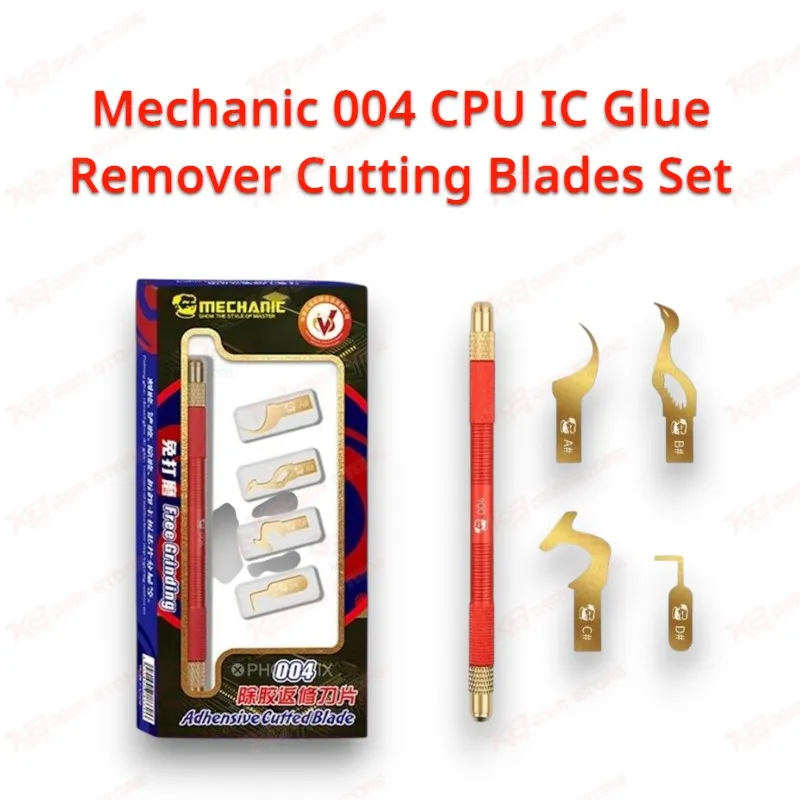
The Mechanic 004 CPU IC Glue Remover Cutting Blades Set gives you one double-ended alloy handle and four shaped steel blades made for cutting underfill and UV glue around BGA chips. Technicians in Lahore, Karachi, and Islamabad reach for it before lifting an iPhone CPU, NAND, or power IC, and again for scraping hardened sealant off the pads once the chip comes off. Mechanic grinds every edge by hand from 0.1mm AAAA-grade steel and finishes the blades with gold plating over a nickel base, so they slide under a chip edge without gouging the board. Keep this set next to your hot air station for every chip-level job.
SKU:MST-SOLDERING-TOOLS-653
⚖️ Weight: 0.01 kg
- Safe & Secure Payment
- Fast Delivery
- WhatsApp Support


Description
FAQ
What is the product name?
The product name is Mechanic 004 CPU IC Glue Remover Cutting Blades Set.
What is the brand of this product?
The brand of this product is Mechanic.
What is the model of this product?
The model of this product is 004.
What is this product used for?
This product is used for cutting underfill and UV glue around BGA chips, removing motherboard sealant, and cleaning glue and solder paste residue from pads during CPU, NAND, and IC rework.
Which devices are compatible with this product?
This product is compatible with iPhone A8 to A12 CPU boards and works universally on smartphone motherboard BGA chips sealed with underfill or UV glue.
Who should use this product?
This product is suitable for mobile repair technicians, repair shops, service centers, and professional users.
Does the Mechanic 004 crescent blade work for iPhone A12 CPU underfill removal?
Yes. The crescent knife follows the edge profile of iPhone A8, A9, A10, A11, and A12 CPU BGA chips, so you can cut the underfill line around the package before lifting it with hot air.
How thick are the Mechanic 004 blades, and can they handle heat during hot air rework?
The blades use 0.1mm imported AAAA-grade steel with heat- and wear-resistant properties, so you can keep cutting and scraping glue while the board heats under your hot air station.