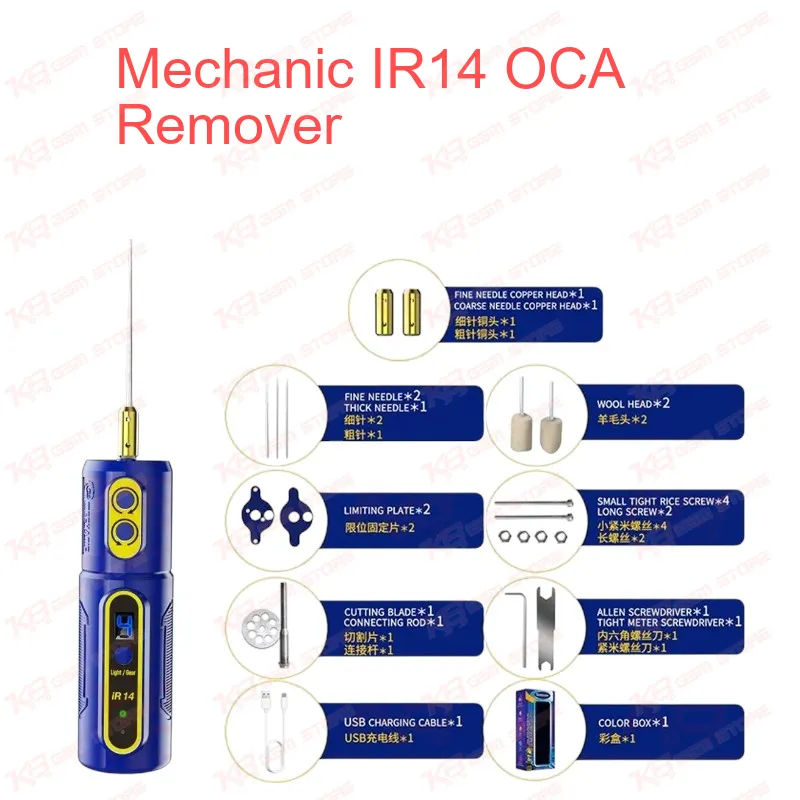
Screen refurbishing succeeds or fails at the cleaning stage, because any OCA residue, fibre, or dust you leave on the panel shows up as bubbles, white spots, or a hazy patch once the new glass goes on, and the Mechanic IR14 OCA Remover gives you a motorized way to strip that adhesive layer without scraping the panel by hand. After you separate the broken glass from the display with a separator machine and cutting wire, a layer of optically clear adhesive usually stays stuck to the polarizer surface, and the traditional workshop method relies on glue remover liquid, a plastic card, and a lot of thumb pressure that often scratches the polarizer or cracks the edge of an expensive OLED. The Mechanic IR14 replaces that routine with a pen-style electric rotary tool: you fit one of the supplied copper heads or the needle, start the unit with a single key, and let the spinning head roll the OCA off in strips while you guide it across the panel. Mechanic built the motor with four speed gears, and the LED digital display shows the gear you have selected, so you can start slow on the fragile edges of a panel and step up the speed across the centre area where the adhesive sits thickest. The motor also runs in forward and reverse, and that matters more than it sounds, because OCA tends to peel cleanly in one direction and bunch up in the other depending on how the glass separated, so flipping the rotation lets you follow the residue instead of dragging it back over the panel. A green dust display light sits at the front end and makes fine dust and leftover adhesive specks stand out against the panel surface, which helps you confirm the screen is truly clean before it goes into the laminator and bubble remover machine, while the front LED lighting keeps your work area visible during late-night jobs or at a dim corner of the counter. For daily shop use, Type-C charging lets you top up the IR14 with the same cable and charger already sitting on most repair counters, and the unit powers itself off after one minute without operation, so a tool left running on the bench does not drain its battery before the next job. Mechanic rates the tool for up to 10 hours of continuous work and specifies a motor that stays cool and does not stall, which comfortably covers a full shift of glass change orders. The body uses a PC and ABS housing, measures 35 x 35 x 120 mm, and weighs around 223 g, giving you a pen-like grip with enough weight to stay steady without tiring your wrist during a batch of screens. Inside the box you get the electric remover, a USB charging cable, two copper heads, and a needle, so you can start work the same day. Where does this tool fit in a complete screen repair workflow? A typical glass-only replacement moves from preparing the assembly, to separating the glass with a separator and molybdenum or diamond wire, to OCA removal, to cleaning, to OCA film lamination, to glass lamination, and finally to bubble removal, and the Mechanic IR14 OCA Remover handles the OCA removal step while speeding up the cleaning step, which are exactly the stages where most technicians lose time and panels. When you rush those stages with a blade or card, you risk a scratched polarizer, a dead touch zone near the edge, or a display problem that the customer brings back a week later, and every comeback costs you the price of a replacement panel. A rotary head applies even, controlled contact across the surface, so you get more consistent results from one screen to the next, and new staff on your bench learn the process faster because the tool handles the repetitive work. Since the IR14 works on the adhesive layer rather than on any specific phone model, it suits shops that refurbish smartphone displays in volume across common brands, and it also helps on tablet panels that use OCA bonding. For a complete refurbishing station, pair the IR14 with a screen separator, an OCA laminating machine, a bubble remover, and a microscope for close inspection, and keep a hot air station, soldering station, and PCB holder nearby for frame, flex, and connector work; as your volume grows, you can add dedicated cutting and grinding machines to the same bench and keep the IR14 as your fast cleaning tool. Keep the copper head clean between panels, begin at a low gear on thin OLED panels, and let the tool do the work rather than pressing down hard, because heavy pressure with any rotary tool can still mark a polarizer. For Pakistani repair shops, service centers, and training institutes that handle daily glass change orders, the Mechanic IR14 OCA Remover offers a compact, affordable upgrade from hand-rubbing that cuts cleaning time, lowers panel damage, and keeps your refurbishing output consistent.