Skip to product information
1 of 4
Brand: MECHANIC

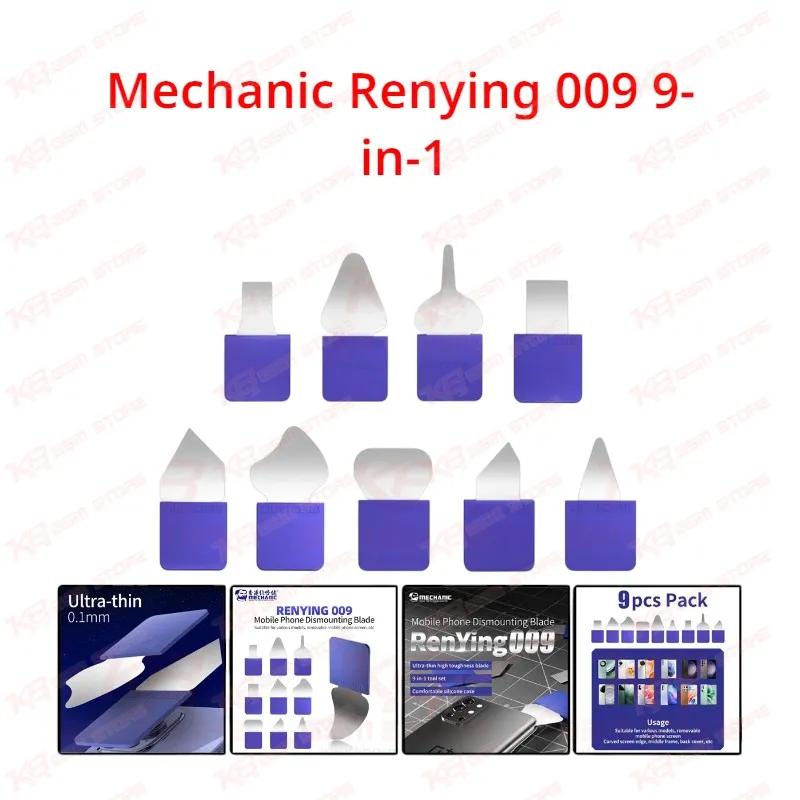
Mechanic Renying 009 9-in-1

Mechanic Renying 009 9-in-1

Regular price Rs.1,500.00 PKR
Regular price Sale price Rs.1,500.00 PKR
Sale Sold out
Shipping calculated at checkout.
Quantity

The Mechanic Renying 009 9-in-1 blade set gives mobile repair technicians nine ultra-thin, high-toughness blades for opening phones without cracking glass or tearing flex cables. Each blade slips into tight adhesive gaps around displays, curved screen edges, middle frames, and back covers, while the silicone sleeve keeps your grip steady and covers the edge between jobs. Use a rounded blade for screen separation and a sharper blade to cut through back glass adhesive. A practical, everyday opening kit for repair shops and service centers across Pakistan that open phones every day.

SKU:MST-SOLDERING-ACCESSORIES-743

⚖️ Weight: 0.3 kg

  • Safe & Secure Payment
  • Fast Delivery
  • WhatsApp Support
View full details

Description

Every smartphone repair starts with the adhesive, and the tool you slide into that first gap decides whether the job ends with a clean separation or a cracked display, which is exactly the problem the Mechanic Renying 009 9-in-1 blade set solves for technicians who open phones all day. Mechanic designed this kit around nine ultra-thin, high-toughness blades, each shaped for a different stage of disassembly, so you stop forcing one generic pry tool into every seam and start matching the blade profile to the job in front of you. The thin edge enters the narrow gap between a display panel and its frame without levering hard against the glass, and the tough blade body resists bending when you work it along a stubborn glue line. Each blade sits in a comfortable silicone sleeve that grips your fingers, reduces hand fatigue during long opening sessions, and covers the edge when the tool rests on your bench, which matters in a busy repair shop where loose blades on a crowded mat cause cut fingers and scratched screens. The real value of this set shows up in how you split tasks between blade shapes. For screen removal, pick a slightly rounded blade and ease it under the display edge, lifting gradually so the rounded profile spreads pressure and keeps you from scoring the panel assembly or catching the display flex. For back cover removal, switch to a sharper blade, run it along the border, and slice the adhesive a little at a time until the glass or plastic panel releases from the back frame. Curved screen edges demand the same patience, and the thin profile lets you follow the curve instead of prying straight up against fragile edge glass. Middle frame separation follows the same logic, with the firmer blades giving you steady control around the perimeter. One rule deserves serious attention on every bench: never use a sharp blade to remove a battery, because a puncture during disassembly creates a genuine fire and safety hazard, so switch to a non-metal pry tool or card for battery lift work. Where does this kit sit in a real repair workflow? It comes first, before any board-level diagnosis begins. A dead phone, a charging issue, a network issue, a boot loop issue, or a unit that keeps hanging on the logo all need the device opened before you can check the charging port, reseat a connector, measure lines with a multimeter, or move the board to the hot air station for IC work. A display problem job starts and ends with these blades, because you use them to open the damaged screen and again to clean old adhesive from the frame before fitting the new panel. For the cleanest results, soften the glue with gentle heat first from a hot air station or separator plate, then let the blade do the finishing cut rather than the heavy lifting, which protects both the glass and your blade edges. Once the phone is open, the rest of your bench takes over: a PCB holder secures the board, a microscope lets you inspect pads and connectors, a soldering station handles connector and component work, and a reballing kit steps in when the fault goes down to chip level. Every one of those tools depends on a damage-free opening, because a cracked back glass or torn flex cable at step one turns a simple repair into a costly one and a difficult conversation with your customer. Pakistani repair shops handle a heavy daily mix of budget and flagship phones from every major brand, and a universal opening kit like this one keeps you ready for whatever lands on your counter without hunting for separate tools. Build a simple habit around the set to extend its life: inspect each blade before use, keep the edge away from the battery area, wipe off adhesive residue after every job, and store each blade back in its silicone protector. Treat these blades as the entry point of your repair workflow and they will reward you with faster openings, fewer broken screens, and more confident back glass replacements on every shift.

Key Features

  • Nine-piece blade set covering screen, curved edge, frame, and back cover opening tasks in one kit
  • Ultra-thin blade profile slips into tight adhesive gaps without prying hard against display glass
  • High-toughness blades resist bending while you cut along stubborn glue lines
  • Rounded blade profiles spread pressure during screen separation to protect the panel assembly
  • Sharper blade profiles cut back cover adhesive cleanly for glass and plastic back panel removal
  • Comfortable silicone handle sleeve provides an anti-slip grip and reduces hand strain on long jobs
  • Silicone blade protector covers the edge during storage for a safer, tidier repair bench
  • Universal design works across phone brands rather than locking you to a single model

Specifications

Brand Entity Mechanic
Product Entity Mechanic Renying 009 9-in-1 Ultra-Thin Opening Blade Set
Technology Entity Ultra-thin, high-toughness blade design with silicone anti-slip handle and blade protector
Compatible Device Entities Universal smartphones — screens, curved-edge displays, middle frames, back covers
Repair Process Entity Phone disassembly, screen separation, back glass removal, adhesive cutting, frame separation
Industry Entity Mobile Phone Repair, PCB Repair Workflow, Professional Technician Tools

Compatible Devices

  • Universal — not device-specific
  • Smartphones with adhesive-bonded front displays
  • Phones with curved-edge screens
  • Phones with glass or plastic back covers secured by adhesive
  • Phone middle frame assemblies

Common Repair Uses

  • Display separation for screen replacement jobs
  • Curved-edge screen opening
  • Back glass and back cover removal by cutting adhesive along the border
  • Middle frame separation during full disassembly
  • Opening dead or faulty phones before board-level diagnosis and charging port repair
  • Scraping old adhesive from frames before fitting a new screen or back cover

FAQ

What is the product name?
The product name is Mechanic Renying 009 9-in-1 Ultra-Thin Mobile Phone Opening Blade Set.
What is the brand of this product?
The brand of this product is Mechanic.
What is the model of this product?
The model of this product is Renying 009.
What is this product used for?
This product is used for opening mobile phones, including screen separation, curved-edge display opening, middle frame separation, and back cover removal.
Which devices are compatible with this product?
This product is compatible with a wide range of smartphone models, as it is a universal opening tool and not device-specific.
Who should use this product?
This product is suitable for mobile repair technicians, repair shops, service centers, and professional users.
Which blade should I use for screen separation and which for back glass removal?
Use a slightly rounded blade for screen separation, lifting the display edge carefully to avoid scratching the screen assembly. Use a sharper blade for back cover removal, cutting the adhesive along the border a little at a time until the panel releases from the back frame.
Can I use these blades to remove a phone battery?
No. Mechanic advises against using any sharp blade for battery removal, because damaging the battery during disassembly creates a safety hazard. Use a non-metal pry tool or card for battery lift work.