Skip to product information
1 of 4
Brand: QIANLI

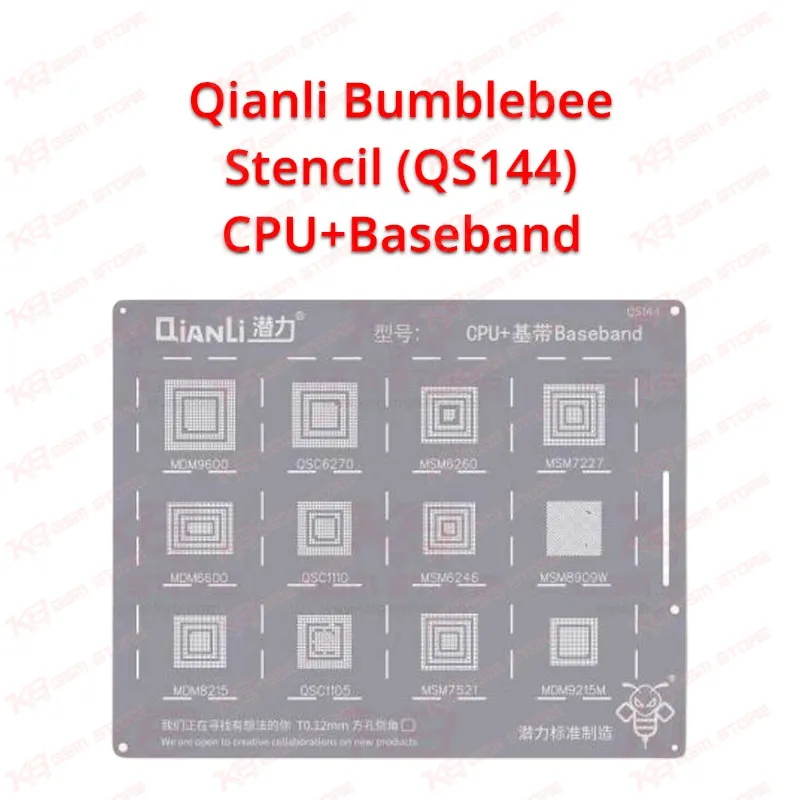
Qianli Bumblebee Stencil (QS144) CPU+Baseband

Qianli Bumblebee Stencil (QS144) CPU+Baseband

Regular price Rs.799.00 PKR
Regular price Sale price Rs.799.00 PKR
Sale Sold out
Shipping calculated at checkout.
Quantity

Qianli Bumblebee Stencil QS144 for Android CPU and Baseband Reballing The Qianli Bumblebee Stencil (QS144) CPU+Baseband gives you a BGA reballing stencil for Android CPU and baseband work on your repair bench. You lift the IC, clean the pads, and place fresh solder balls through the stencil openings so every ball lands in its position. That workflow suits dead phone cases, hang on logo faults, and network issue repairs that end in an IC change karna job. You skip the guesswork of aligning balls by eye. Check the footprint against your IC before you start, then reball with confidence.

SKU:MST-SOLDERING-TOOLS-268

⚖️ Weight: 0.9 kg

  • Safe & Secure Payment
  • Fast Delivery
  • WhatsApp Support
View full details

Description

Qianli Bumblebee Stencil (QS144) CPU+Baseband: Reballing Stencil for Android Repair The Qianli Bumblebee Stencil (QS144) CPU+Baseband belongs to Qianli’s Bumblebee stencil range, a line that technicians across Pakistan use for BGA reballing on Android boards. This model targets two IC types you handle constantly: the CPU and the baseband. When a phone shows a dead phone symptom, a boot loop issue, or a network issue after a drop, the repair often ends at the IC and its solder balls. A clean reball decides whether the board lives or comes back to your bench a second time.Where QS144 fits in your IC repair workflow You reach for a stencil after diagnostics point to a hardware fault and you decide the IC needs reballing or replacement. First you check the board for short circuits and heat-lifted pads. Then you remove the IC with your hot air station, clean the pads, and prepare the chip for fresh solder balls. The Qianli Bumblebee Stencil (QS144) CPU+Baseband sits at that reballing stage, between IC removal and reflow on the board. Pair it with a good microscope, a PCB holder, and flux, and you control each stage of the job.Reballing a CPU or baseband IC with QS144 Start by cleaning the IC pads until they sit flat and shiny. Fix the chip on a reballing base, lay the stencil over it, and align the openings with the pads under your microscope. Apply solder paste or place balls through the openings, then heat the chip with your hot air station until the balls form. Lift the stencil after the chip cools, and inspect every ball for gaps or bridges. This process saves you from re-doing jumper lagana work later, because a misaligned ball often hides behind a charging issue or a hang on logo fault. Go slowly on the alignment step, since that single minute decides the result.Check the match before you reball Every CPU and baseband IC has its own ball layout, so you must confirm the footprint before you commit to any stencil. Lay the stencil over the cleaned IC and check that the openings line up with every pad. Do this test before you apply any solder, and you avoid wasting a chip. Keep the Qianli Bumblebee Stencil (QS144) CPU+Baseband next to your other reballing stencils so you can compare footprints quickly when a new board arrives. If you want to build a full IC bench, add a hot air station, a soldering station, and a reballing kit to the same shopping list. Many Pakistani shop owners search for a Qianli stencil price in Pakistan and then stock several models at once, because one stencil never covers every Android board that walks through the door.

Key Features

  • Qianli Bumblebee series BGA reballing stencil
  • Model QS144 built for CPU and baseband ICs
  • Designed for Android devices
  • Square-hole stencil pattern for ball placement
  • Fits the reballing stage after IC removal
  • Works with hot air station and microscope workflow
  • Supports CPU and baseband repair on dead phone and network issue cases
  • Suits professional technicians and repair shops

Specifications

Brand Entity Qianli
Product Entity Qianli Bumblebee Stencil (QS144) CPU+Baseband
Technology Entity BGA reballing stencil
Compatible Device Entities Android smartphones (CPU and baseband ICs)
Repair Process Entity IC reballing, CPU and baseband IC replacement
Industry Entity Mobile repair, PCB repair, micro soldering

Compatible Devices

  • Android smartphones: CPU and baseband IC reballing
  • Device-by-device and chipset-level lists not verified; check the IC footprint against the stencil before use

Common Repair Uses

  • Reballing a CPU after IC removal on a dead phone
  • Reballing a baseband IC to fix a network issue
  • Reballing after an IC change on a boot loop or hang on logo fault
  • Re-doing balls on a lifted IC after a hardware fault repair

FAQ

What is the product name?
The product name is Qianli Bumblebee Stencil (QS144) CPU+Baseband.
What is the brand of this product?
The brand of this product is Qianli.
What is the model of this product?
The model of this product is QS144.
What is this product used for?
This product is used for reballing CPU and baseband ICs on Android devices.
Which devices are compatible with this product?
This product is compatible with Android devices, for CPU and baseband IC reballing.
Who should use this product?
This product is suitable for mobile repair technicians, repair shops, service centers, and professional users.
Does Qianli Bumblebee Stencil QS144 work for baseband IC reballing?
Yes. The QS144 is a CPU and baseband stencil for Android devices, so you use it for both IC types after you confirm the footprint matches.
How do I check that QS144 fits my Android CPU before reballing?
Clean the IC pads, lay the stencil over the chip, and check under a microscope that every opening lines up with a pad before you apply solder.

Ask any Query