Skip to product information
1 of 4
Brand: QIANLI

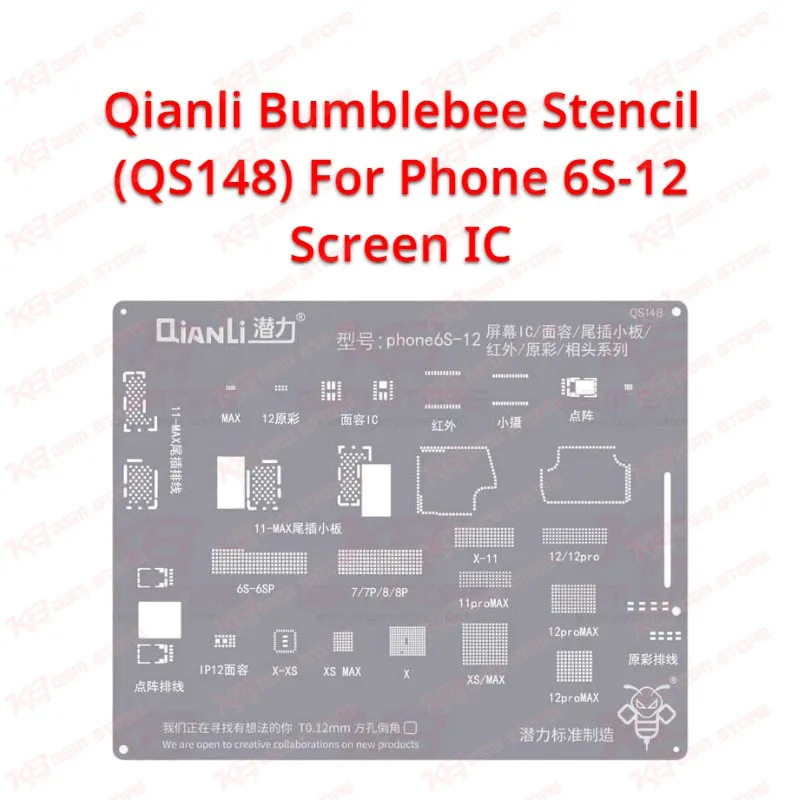
Qianli Bumblebee Stencil (QS148) For Phone 6S-12 Screen IC

Qianli Bumblebee Stencil (QS148) For Phone 6S-12 Screen IC

Regular price Rs.799.00 PKR
Regular price Sale price Rs.799.00 PKR
Sale Sold out
Shipping calculated at checkout.
Quantity

The Qianli Bumblebee Stencil (QS148) For Phone 6S-12 Screen IC gives you a dedicated reballing template for the display IC on iPhone 6S to iPhone 12 boards. You lift the old chip, clean the pads, and use the stencil to lay fresh solder so the IC sits flat and makes proper contact again. Display problem jobs like no display, flicker, or dead touch often lead you to the screen IC. If your shop does regular IC change karna work on iPhone screens, this stencil keeps your reballing consistent. Order it from KB GSM Store and check the price in Pakistan before you stock up.

SKU:MST-SOLDERING-TOOLS-274

⚖️ Weight: 0.9 kg

  • Safe & Secure Payment
  • Fast Delivery
  • WhatsApp Support
View full details

Description

Qianli QS148 Bumblebee Stencil for iPhone 6S to 12 Screen IC Reballing The Qianli Bumblebee Stencil (QS148) For Phone 6S-12 Screen IC handles one job on your bench: reballing the display IC on iPhone boards from the 6S generation up to the 12 generation. When a screen IC lifts or fails, you cannot refit it without fresh solder balls, and freehand balling wastes time and damages pads. This stencil gives you a fixed pattern, so every ball lands where the IC expects it. It slots straight into a normal microsoldering routine next to your hot air station and soldering iron.Where QS148 Fits in Your Repair Workflow You reach for this stencil after diagnosis, not before. A hardware fault on the display side usually shows up as a black screen with the phone still alive, a flickering panel, or a touch problem that no replacement screen fixes. Once you confirm the screen IC is the culprit, you remove it, clean the board pads, and reball the chip before you refit it. QS148 covers the reballing stage of that job. Because the Bumblebee series targets iPhone display ICs, you spend less time hunting for a matching pattern and more time finishing the repair.Reballing the Screen IC Step by Step Start by checking that the stencil pattern matches your IC under the microscope. Apply flux, remove the old solder from the chip with your iron, and clean the pads until they sit flat and bright. Hold the IC steady, align it with the stencil, and work your solder paste across the openings. Heat the stencil with your hot air station until the paste forms balls, then let everything cool before you lift the stencil away. Check each ball under magnification. If you see a missing or merged ball, clean the chip and repeat. Rushed heating is the usual cause of bridging, so take your time on this step.Who Should Buy It and What to Pair It With Repair shops that run daily iPhone display jobs get the most from QS148. Technicians who offer IC-level service, rather than only screen swaps, can handle boot-time display faults in-house instead of sending boards out. Pair the stencil with a good hot air station, a temperature-controlled soldering station, a microscope, a reballing kit, and a PCB holder to keep the board steady while you work. If your customers bring newer iPhones, Qianli also sells Bumblebee stencils for later series, which gives you a clear upgrade path as your workload grows. KB GSM Store stocks the tools around this stencil, so you can build one complete reballing setup in a single order.

Key Features

  • Dedicated reballing stencil for iPhone screen ICs
  • Part of the Qianli Bumblebee series
  • Model QS148 for the iPhone 6S to 12 range
  • Gives every solder ball a fixed, repeatable position
  • Cuts down freehand balling errors and pad damage
  • Works with your existing hot air station and soldering iron
  • Suits shops that do regular iPhone display IC repair
  • Supports IC-level repair instead of full screen replacement

Specifications

Brand Entity Qianli
Product Entity Qianli Bumblebee Stencil QS148
Technology Entity BGA reballing stencil
Compatible Device Entities Apple iPhone 6S to iPhone 12 series
Repair Process Entity Screen IC reballing and IC change karna
Industry Entity Mobile repair, PCB repair, microsoldering

Compatible Devices


Apple iPhone 6S to iPhone 12 series (screen IC reballing, as per the product designation)

Common Repair Uses

  • Reballing the display IC after IC change karna on an iPhone board
  • Fixing no display or black screen faults caused by a lifted or failed screen IC
  • Repairing flickering display problem on iPhone boards at IC level
  • Reballing a salvaged screen IC before you refit it

FAQ

What is the product name?
The product name is Qianli Bumblebee Stencil (QS148) For Phone 6S-12 Screen IC.
What is the brand of this product?
The brand of this product is Qianli.
What is the model of this product?
The model of this product is QS148.
What is this product used for?
This product is used for reballing the screen IC on iPhone boards.
Which devices are compatible with this product?
This product is compatible with Apple iPhone 6S to iPhone 12 series screen ICs.
Who should use this product?
This product is suitable for mobile repair technicians, repair shops, service centers, and professional users.
Can I use QS148 to reball iPhone screen ICs without a hot air station?
No. You need a hot air station to heat the stencil and form the balls, so set up a stable temperature before you start.
How do I check the QS148 stencil pattern matches my iPhone screen IC?
Place the IC against the stencil under your microscope and confirm every opening lines up with a pad before you apply paste.

Ask any Query