Skip to product information
1 of 5
Brand: RF4

RF4 RF-TP20 Micro-USB Type-C Charging Port Protector

RF4 RF-TP20 Micro-USB Type-C Charging Port Protector

Regular price Rs.500.00 PKR
Regular price Sale price Rs.500.00 PKR
Sale Sold out
Shipping calculated at checkout.
Quantity

Dual-Head Charging Port Protector for Hot Air Rework
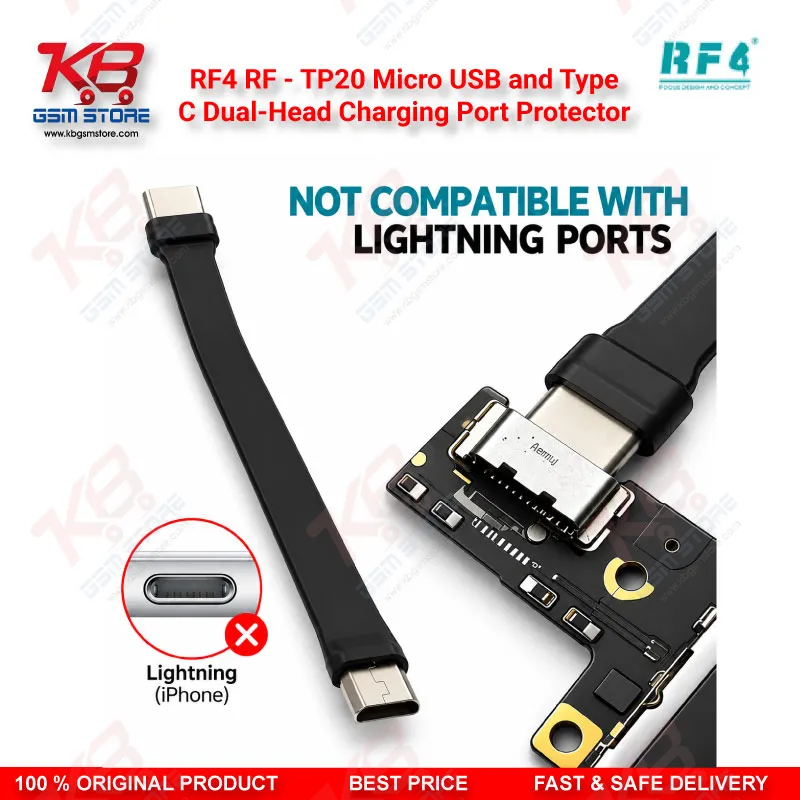
When you replace components near a charging connector, reflow a nearby part, or run hot air across the bottom board, the plastic tongue inside the port usually softens and warps first. The RF4 RF-TP20 Micro-USB and Type-C Dual-Head Charging Port Protector plugs straight into the port and blocks direct airflow, so the internal plastic keeps its shape while you work around it. One end fits Micro-USB and the other fits Type-C, so a single tool covers both port types that land on your repair bench every day. No setup and no extra tools: insert it, finish the job, and pull it out.

SKU:MST-FLASHING-DEVICE-30

⚖️ Weight: 0.01 kg

  • Safe & Secure Payment
  • Fast Delivery
  • WhatsApp Support
View full details

Every technician who works on Android bottom boards knows the story: you heat the charging area to lift a shield, remove a damaged component, or reflow a charging IC, and the plastic insulator inside a perfectly good Micro-USB or Type-C port bends, bubbles, or melts. The customer walked in with a charging issue, and now the port itself has become a second hardware fault. The RF4 RF-TP20 Micro-USB and Type-C Dual-Head Charging Port Protector stops that exact problem. You push the matching head into the port before the hot air nozzle or soldering iron comes close, and the protector fills the opening, insulates the plastic tongue, and keeps hot air from blowing straight into the connector cavity. RF4 built the RF-TP20 as one dual-head tool, with a Micro-USB head on one end and a Type-C head on the other, so you never hunt through a drawer for two separate plugs when the next phone uses a different port standard. In a Pakistani repair shop where older budget handsets with Micro-USB sit right beside newer Type-C models, that one-tool approach saves real time across a busy day. The protector measures 112 mm in length, which gives your fingers enough grip to insert and remove it cleanly without tweezers and keeps your hand away from the heat zone. The workflow stays simple: identify the port type, insert the correct end until it seats, set your hot air station or soldering station for the job, finish the rework, let the board cool, and pull the protector out. No clamps, no adhesive, no extra setup. That plug-and-play design matters when you handle several charging jobs back to back, because you skip wrapping ports in Kapton tape or foil and then scraping residue off afterwards. Think about where the RF-TP20 fits in a typical charging repair. A phone arrives with a charging complaint, you run a quick check with a multimeter or USB tester, and you trace the fault to a cracked solder joint or a damaged component on the charging line. If the port body still works and you only need to reflow surrounding parts, the protector keeps that port intact, so you avoid an unnecessary replacement. If you rework parts on a charging sub-board, the protector shields the connector while the board sits in a PCB holder under heat. Under a microscope, you then confirm the port plastic stayed straight before you reassemble the phone. That final check saves you from comebacks where a phone leaves the shop charging fine and returns a week later with a deformed port. One limitation deserves a clear mention: the RF-TP20 does not fit Lightning ports, so keep it away from iPhone models with Lightning connectors and check the port type before every job. It covers Micro-USB and Type-C only, and it does that job well. For shop owners stocking bench accessories, the RF-TP20 sits naturally beside the rest of your rework kit: a hot air station for component removal, a soldering station for pin work, a reballing kit for IC jobs near the charging area, a PCB holder to keep the board steady, and a microscope for inspection. If you handle board-level charging repairs regularly, a hot air station with stable airflow and precise temperature control makes the natural upgrade, because steady airflow plus physical port shielding gives you the cleanest results. The RF4 RF-TP20 suits mobile repair technicians, charging port specialists, training institutes teaching rework basics, and any shop that wants fewer melted ports and fewer customer complaints. Compared with the cost of a ruined port and a lost customer, this small tool pays for itself on the first job it saves.

Key Features

  • Dual-head design: Micro-USB on one end, Type-C on the other
  • Prevents charging port plastic from melting during soldering and rework
  • Blocks hot air from entering the connector cavity
  • Protects the internal plastic tongue and insulator of the port
  • Plug-and-play use with no tools or installation steps
  • 112 mm body length for easy grip and removal
  • Replaces messy Kapton tape or foil wrapping around ports
  • Reusable across repeated charging-area repair jobs

Specifications

Brand Entity RF4
Product Entity RF4 RF-TP20 Dual-Head Charging Port Protector
Technology Entity Physical heat insulation for USB charging connectors
Compatible Device Entities Smartphones and devices with Micro-USB or USB Type-C charging ports
Repair Process Entity Hot air rework, soldering, charging port and charging section repair
Industry Entity Mobile phone repair and PCB rework

Compatible Devices

  • Smartphones and tablets with USB Type-C charging ports
  • Smartphones and tablets with Micro-USB charging ports
  • Not compatible with Lightning ports (iPhone models with Lightning connectors)

Common Repair Uses

  • Shielding the charging port during hot air removal of nearby components
  • Protecting the port while reflowing or replacing a charging IC
  • Soldering work on charging sub-boards and flex connections near the port
  • Preventing port deformation during shield removal on bottom boards
  • Protecting a working port while you repair other faults on the charging line

FAQ

What is the product name?
The product name is RF4 RF-TP20 Micro-USB and Type-C Dual-Head Charging Port Protector.
What is the brand of this product?
The brand of this product is RF4.
What is the model of this product?
The model of this product is RF-TP20.
What is this product used for?
This product is used for protecting Micro-USB and Type-C charging ports from melting and heat damage during soldering, hot air rework, and charging-area repairs.
Which devices are compatible with this product?
This product is compatible with devices that use Micro-USB or USB Type-C charging ports. It does not fit Lightning ports.
Who should use this product?
This product is suitable for mobile repair technicians, repair shops, service centers, and professional users.
How do I stop the Type-C port from melting while using hot air on the charging IC?
Insert the Type-C end of the RF-TP20 fully into the port before heating. It insulates the port plastic and blocks direct airflow into the cavity, so you can rework the charging IC and nearby parts without warping the connector.
Can I use the RF-TP20 on iPhone charging ports?
No. The RF-TP20 fits Micro-USB and Type-C ports only. It does not fit Lightning ports, so verify the port type before every repair.