Skip to product information
1 of 4

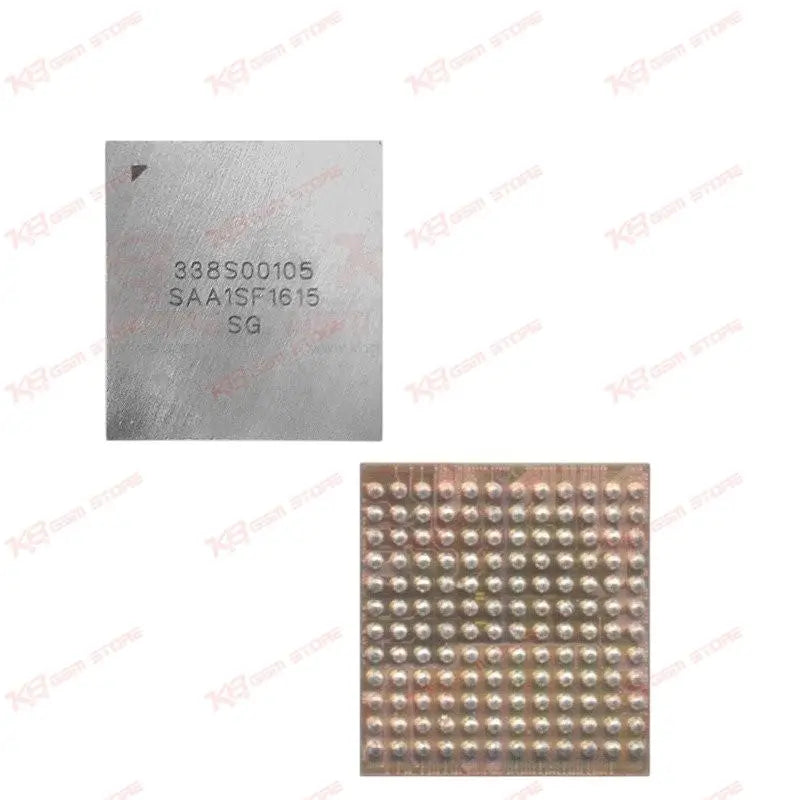
U3101 Big Audio IC for iPhone 7/7 Plus/6s Plus/6s

U3101 Big Audio IC for iPhone 7/7 Plus/6s Plus/6s

Regular price Rs.800.00 PKR
Regular price Sale price Rs.800.00 PKR
Sale Sold out
Shipping calculated at checkout.
Quantity

The U3101 Big Audio IC, also marked 338S00105, is the main audio codec chip used in iPhone 7, iPhone 7 Plus, iPhone 6s, and iPhone 6s Plus logic boards. This 144-pin BGA chip controls speaker output and microphone input, making it the go-to part for no sound, no mic, or dead audio faults after liquid damage or a bad flash. Built for board-level technicians who already run reballing and BGA soldering setups, this IC gives you a direct replacement path instead of writing off a board with an audio fault. Every unit is tested for pin integrity before packing, so you get a chip that's ready to reball and mount without extra prep work on your bench.

⚖️ Weight: 0.01 kg

SKU:MST-IC-5

  • Safe & Secure Payment
  • Fast Delivery
  • WhatsApp Support
View full details

Description

Audio faults on iPhone 7, 7 Plus, 6s, and 6s Plus boards almost always trace back to one component: the U3101 Big Audio IC. Also labeled 338S00105 on the board, this chip acts as the audio codec, managing both speaker output and microphone input for the handset. When a customer brings in a phone with no sound on calls, dead earpiece audio, or a mic that stopped picking up voice during calls, this IC is one of the first things you check after ruling out the flex cables and connectors. You'll run into this fault pattern most often on liquid-damaged boards, since corrosion under the U3101 pins is one of the most common failure points on these logic boards. It also shows up after a bad software update or failed restore where the audio codec stops responding even though the rest of the board tests fine. In both cases, swapping the chip resolves the issue where cleaning and reflowing alone won't. This is a 144-pin BGA component, so installation is board-level work, not a connector swap. You need a hot air rework station capable of controlled reflow, a reballing stencil matched to the 144-pin footprint, and flux suited for fine-pitch BGA work. Preheating the board evenly before you touch the IC matters here — uneven heat on a board this dense risks lifting nearby components or warping the pads under U3101. If you're already running reballing kits for other iPhone-series ICs, this chip fits the same workflow with no extra tooling required. Before reballing, always check continuity on the board pads first. A shorted or lifted pad under the old IC can mimic an audio IC failure, and reballing a chip onto damaged pads wastes both the part and your time. Clean the site fully with flux and isopropyl alcohol, confirm the pads are flat and free of corrosion, then proceed with reballing using solder balls matched to the original pitch. Once mounted, test speaker and mic function directly — play a test tone through the earpiece and loud speaker, then record a short clip to confirm mic pickup on both the primary and noise-cancelling microphones where applicable. If the board still shows partial audio issues after a clean reball, check the flex cable and connector first before assuming a second IC fault, since flex damage produces similar symptoms. This part is compatible across iPhone 7, iPhone 7 Plus, iPhone 6s, and iPhone 6s Plus boards, since Apple carried the same audio codec design across these two generations. That shared compatibility makes it worth stocking in bulk if you handle repair volume across both models, rather than sourcing separately for each. For shops in Lahore, Karachi, and Islamabad running high-volume board repair, audio faults are a steady share of walk-in complaints, especially on older 6s and 7-series units still active in the market. Keeping this IC on the shelf means you're not turning away no-sound or no-mic repairs or waiting on a supplier reorder mid-job. Reballing your own boards instead of outsourcing to a chip-level shop also keeps your turnaround time and margins under your control.

Key Features

  • Direct replacement for the main audio codec on iPhone 7, 7 Plus, 6s, and 6s Plus boards
  • Controls speaker output and microphone input functions
  • 144-pin BGA package matched to original board footprint
  • Fixes no sound, dead earpiece, and no mic faults
  • Common fix for audio faults following liquid damage
  • Resolves audio codec failures after failed software updates
  • Compatible with standard BGA reballing stencils and rework stations
  • Suitable for board-level repair shops handling volume iPhone repairs

Specifications

Brand Entity Apple
Product Entity U3101 Big Audio IC / 338S00105
Technology Entity BGA Audio Codec Chip
Compatible Device Entities iPhone 7, iPhone 7 Plus, iPhone 6s, iPhone 6s Plus
Repair Process Entity BGA Reballing, Board-Level Repair, Audio IC Replacement
Industry Entity Mobile Repair Industry, PCB Repair

FAQ

What is the product name?
The product is the U3101 Big Audio IC, also marked 338S00105.
What is the brand of this product?
This is an OEM Apple board component used in genuine iPhone logic boards.
What is the model of this product?
The model designation is U3101, also referenced as 338S00105.
What is this product used for?
It replaces a faulty main audio codec IC to fix no sound, dead earpiece, or no mic issues.
Which devices are compatible with this product?
This IC is compatible with iPhone 7, iPhone 7 Plus, iPhone 6s, and iPhone 6s Plus.
Who should use this product?
This product is suitable for mobile repair technicians, repair shops, service centers, and professional users.
Does this chip require soldering to install?
Yes, this is a 144-pin BGA chip that requires hot air rework and reballing, not a plug-in connector swap.
What audio faults does this IC commonly fix?
It resolves no sound on calls, dead earpiece audio, and non-working microphone issues, especially after liquid damage or a failed software update.

Ask any Query