Skip to product information
1 of 4
Brand: YCS

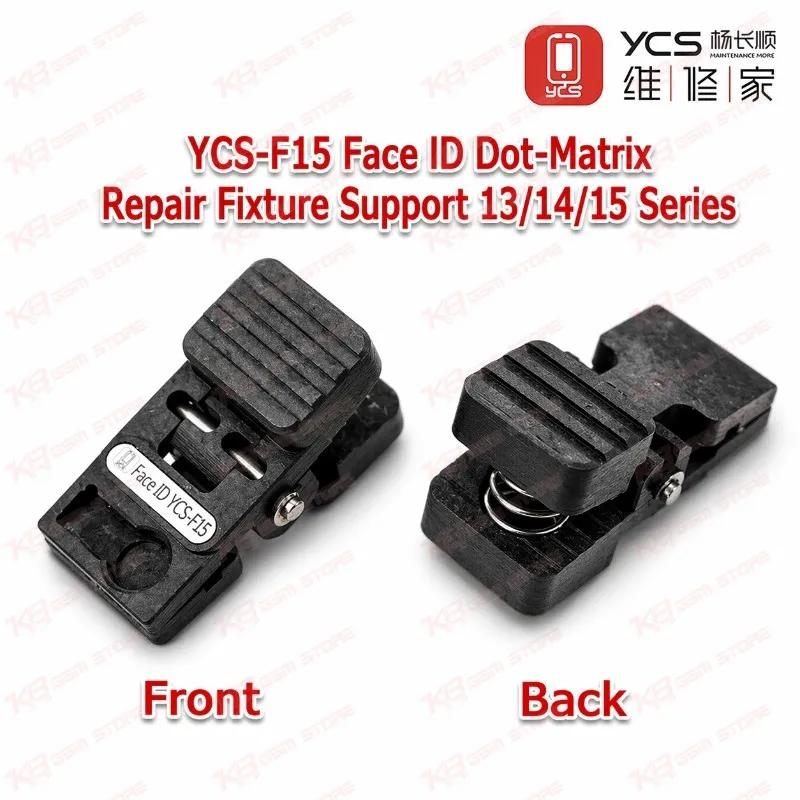
YCS-F15 Face ID Dot-Matrix Repair Fixture Support 13/14/15 Series

YCS-F15 Face ID Dot-Matrix Repair Fixture Support 13/14/15 Series

Regular price Rs.1,200.00 PKR
Regular price Sale price Rs.1,200.00 PKR
Sale Sold out
Shipping calculated at checkout.
Quantity

The YCS-F15 Face ID Dot-Matrix Repair Fixture Support 13/14/15 Series gives you a steady, spring-loaded clamp for dot projector alignment work on iPhone 13, 14, and 15 models. When a customer brings in a phone showing "Face ID is not available" after water damage, a drop, or a rough screen job, this fixture holds the dot-matrix projector parts in an exact position while you realign and reassemble the module. Its tuned spring applies balanced pressure, so you avoid cracking the delicate optics or stressing the flex. It is compact, quick to set up, and suits busy repair benches, iPhone service centers, and technicians across Pakistan who handle TrueDepth camera repairs every day.

SKU:MST-SOLDERING-ACCESSORIES-665

⚖️ Weight: 0.01 kg

  • Safe & Secure Payment
  • Fast Delivery
  • WhatsApp Support
View full details

Description

Face ID failures reach Pakistani repair benches every day, and most of them trace back to one fragile component inside the TrueDepth camera system, the dot projector. On iPhone 13, 14, and 15 series phones, this module projects thousands of infrared dots onto the user's face, and the infrared camera reads that pattern to build a depth map. Liquid damage, a hard drop, careless heat during a back glass or screen job, or a torn front flex can knock the projector out, and the phone then shows the familiar "Face ID is not available" or "move iPhone a little lower" error. Skilled technicians repair these modules instead of telling the customer to live with a dead Face ID, and that repair depends on one thing above all: holding the projector's optical parts in exact alignment. The YCS-F15 Face ID Dot-Matrix Repair Fixture Support 13/14/15 Series handles exactly that step. You load the dot-matrix projector assembly into the fixture, and its specially tuned spring closes with just enough force to grip the parts firmly without crushing the lens stack or bending the flex. Because the clamp locates the module in a fixed position, you get repeatable alignment between the projector's optical element and its emitter section, and that alignment decides whether the module maps faces correctly or still fails the Face ID check after all your work. The design targets single-step alignment: clamp, align, reassemble, and test, with no improvised tweezers-and-tape setup that drifts the moment your hand moves. The fixture covers the full iPhone 13 lineup (13 mini, 13, 13 Pro, 13 Pro Max), the iPhone 14 family (14, 14 Plus, 14 Pro, 14 Pro Max), and the iPhone 15 range (15, 15 Plus, 15 Pro, 15 Pro Max), so one tool handles three generations of the iPhones customers bring to your shop most often right now. That multi-model coverage matters for a Pakistani repair business, where an iPhone desk rarely sees the same model twice in a row and buying a separate jig for every phone eats into thin margins. The body stays small and light, so it sits comfortably under a stereo microscope and leaves space for your tweezers, and you can move it between benches without any setup. Inside a complete Face ID workflow, the YCS-F15 works alongside the rest of your bench equipment rather than replacing it. You open the phone with your screen separation tools, lift out the TrueDepth module, and inspect the projector under one of our microscopes to spot corrosion, burnt traces, or a broken flex. If the job needs flex or connector rework, a precision soldering station with a fine tip and a controlled hot air station handle the heat work, while a PCB holder keeps the logic board steady during any related board-level repair, and a multimeter lets you check flex continuity before you close the phone. After you realign the projector in the YCS-F15 and reassemble the module, you can confirm the result with a dot projector test adapter or programmer from our test boxes range where your workflow calls for one. Technicians moving up from basic screen replacement into real TrueDepth and Face ID repair often start with this fixture because it takes care of the hardest manual part of the process, then add dedicated programmers and test tools as job volume grows. For repair shops in Lahore, Karachi, Islamabad, and every other city where iPhone repair work keeps rising, Face ID restoration remains one of the higher-value services you can offer, since most customers would rather pay for a working Face ID than run a passcode-only phone. A reliable clamping fixture cuts rework, protects expensive parts from slips and cracks, and lets you quote these jobs with confidence, making the YCS-F15 a practical, low-cost entry point into precise dot projector repair on the iPhone 13 to 15 series.

Key Features

  • pecially tuned spring delivers balanced clamping force that grips fragile dot projector parts without cracking the optics
  • Single-step design for dot-matrix projector alignment, replacing unstable tweezers-and-tape setups
  • Fixed positioning gives repeatable alignment between the projector's optical element and emitter section
  • One fixture covers iPhone 13, 14, and 15 series Face ID modules
  • Compact, lightweight body fits easily under a stereo microscope on a crowded repair bench
  • Fast loading and release speeds up Face ID jobs in high-volume repair shops
  • Purely mechanical tool with no power, cables, or software setup needed
  • Low-cost entry tool for shops expanding into Face ID and TrueDepth repair services

Specifications

Brand Entity YCS
Product Entity YCS-F15 Face ID Dot-Matrix Repair Fixture
Technology Entity Face ID, TrueDepth Camera System, Dot Projector (Dot-Matrix Projector), Spring-Loaded Clamping Fixture
Compatible Device Entities Apple iPhone 13 Series, iPhone 14 Series, iPhone 15 Series
Repair Process Entity Face ID Repair, Dot Projector Alignment, TrueDepth Module Reassembly, Water Damage Repair
Industry Entity Mobile Phone Repair, iPhone Repair, Board-Level Repair

Compatible Devices

  • iPhone 13 Series: iPhone 13 mini, iPhone 13, iPhone 13 Pro, iPhone 13 Pro Max
  • iPhone 14 Series: iPhone 14, iPhone 14 Plus, iPhone 14 Pro, iPhone 14 Pro Max
  • iPhone 15 Series: iPhone 15, iPhone 15 Plus, iPhone 15 Pro, iPhone 15 Pro Max

Common Repair Uses

  • Dot projector (dot-matrix) realignment during Face ID repair
  • Restoring Face ID after "Face ID is not available" errors caused by water damage
  • Face ID repair after drop damage or impact on the TrueDepth module
  • Holding the projector assembly steady during reassembly after flex or component repair
  • Handling and inspecting the dot projector under a microscope without slips or cracks

FAQ

What is the product name?
The product name is YCS-F15 Face ID Dot-Matrix Repair Fixture Support 13/14/15 Series.
What is the brand of this product?
The brand of this product is YCS.
What is the model of this product?
The model of this product is YCS-F15.
What is this product used for?
This product is used for clamping and aligning the dot-matrix projector during Face ID repair on iPhone 13, 14, and 15 series phones.
Which devices are compatible with this product?
This product is compatible with iPhone 13, 13 mini, 13 Pro, 13 Pro Max, 14, 14 Plus, 14 Pro, 14 Pro Max, 15, 15 Plus, 15 Pro, and 15 Pro Max.
Who should use this product?
This product is suitable for mobile repair technicians, repair shops, service centers, and professional users.
Does the YCS-F15 fit iPhone X, 11, or 12 series Face ID modules?
No. Its verified coverage is the iPhone 13 to 15 series. Older iPhone X, 11, and 12 modules need their own series-specific dot projector calibrators.
Can the YCS-F15 fix Face ID on its own?
No. It is a mechanical clamping and alignment fixture. It holds the dot projector in exact position during alignment and reassembly, but you still need to diagnose and repair the underlying fault, such as a damaged flex or corrosion, using your soldering and inspection tools.
Does this fixture need power or software?
No. The YCS-F15 works as a spring-loaded mechanical clamp, so it needs no power supply, cable connection, or software.