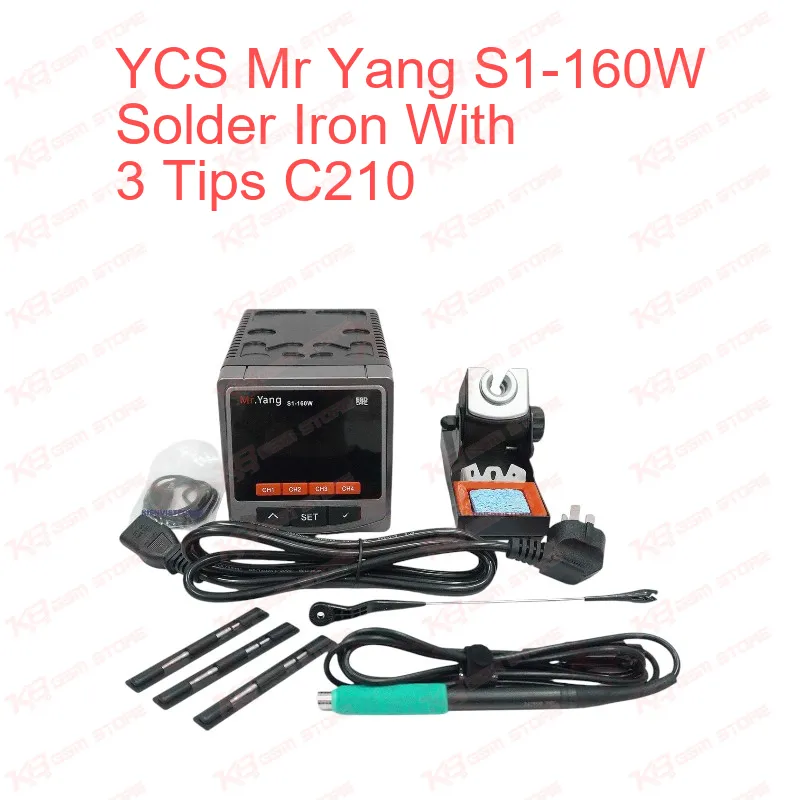
The YCS Mr Yang S1-160W Solder Iron With 3 Tips C210 puts 160W of peak power into a compact digital station built for one job: clean, fast, controlled heat at the tip of a C210 cartridge on a crowded mobile logic board. Many repair benches still run older soldering irons that use AC voltage temperature control, and the weakness shows the moment you touch a large ground pad. The tip temperature sags, the solder turns dull, and you hold heat on the board far longer than the component can tolerate. The S1 replaces that approach with a program chip that drives the heating element directly. The tip reaches working temperature in around 2 seconds, and built-in temperature compensation keeps it at the set value while you solder. On a busy counter where ten phones wait in line with charging issue, network issue, and dead phone complaints, that speed matters more than any number on a spec sheet. You lift the handle, the tip heats, you finish the joint, you put it down, and the station drops straight into sleep mode, so the tip does not wear out sitting at 400°C while you search for a part. The C210 cartridge format is the center of this tool. A C210 tip carries its heater and sensor directly behind the point, which keeps the thermal path extremely short. That design is why micro-soldering technicians prefer it for tiny passive components, small filter capacitors around the PMIC, and the fine pins on charging ICs and audio ICs. This kit ships with a C210 handle and three C210 tips, so you have a ready starter set for fine, medium, and general work from day one. The station also accepts C245 and C115 handles and their matching tips. You can add a heavier C245 handle for shield frames, USB connectors, and battery terminals, or a lighter C115 handle for the smallest components, without replacing the base unit. That upgrade path keeps one station on your bench instead of three. Temperature adjusts from 100°C to 450°C, which covers everything from low-temperature solder on heat-sensitive flex connectors up to lead-free joints on thick ground planes. A four-segment memory display stores your most-used temperatures, so switching between a low setting for a fragile FPC connector and a higher setting for a charging port takes one press instead of repeated scrolling. In a typical Pakistani workshop, the S1 fits into several repair stages. During board-level diagnosis, you use it to lift a suspected shorted capacitor off a power rail once your multimeter and DC power supply have isolated the line. During IC work, it handles cleanup after a hot air station removes a chip. You tin the pads, clear old solder with wick, and level the surface before you place a new IC or reball it with a stencil from your reballing kit. The same iron also matters on software jobs. When a phone shows hang on logo, boot loop, or dead after flash symptoms and a normal box cannot reach it, technicians solder fine wires onto test points for ISP access. A C210 tip lets you place those jumpers cleanly on tiny CMD, CLK, and DAT points, and it pairs directly with your ISP pinout tools, eMMC programmers, and UFS adapters for data recovery or direct memory programming. Without a precise iron, jumper work on a modern board turns risky, because one lifted pad can turn a simple software job into a permanent hardware fault. The station also protects itself. Mechanical short-circuit protection stops operation automatically when the unit detects a short, which shields both the station and your board from a sudden failure. A Type-C port lets you update the firmware. You enter temperature calibration by holding the plus and minus keys together, which keeps the displayed value accurate after months of daily use. The angle-adjustable sleep stand lets you set the handle at a comfortable resting position, and the AC 110V/220V input lets the unit run directly on standard Pakistani mains. For tip care, the kit includes a sponge and a copper cleaning ball. Use the copper ball for most cleaning, since it removes oxidation without the sudden temperature drop that a wet sponge causes. Re-tin the tip before you return it to the stand. That one habit noticeably extends the working life of a C210 cartridge in a high-volume shop. In a complete repair setup, the S1 works as the precision partner to your hot air station. Hot air handles large-area heating for IC removal and back cover adhesive. The iron handles point-specific work that hot air cannot do without disturbing nearby parts. Place it next to a stereo microscope for visual control, a PCB holder to lock the board flat, and a reballing kit for BGA work, and you have the core of a board-level bench. Shops that already own a basic analog soldering station often treat the S1 as their first step into cartridge-based micro-soldering before they move to multi-channel stations. Training institutes benefit as well, because fast heat-up and auto sleep reduce tip damage when students leave irons sitting hot between exercises. The iron works the same on iPhone, Samsung, Oppo, Vivo, Infinix, and Tecno boards. What matters is pad size, thermal mass, and solder type, and the C210 format handles the fine end of that range well. If your daily load is mostly small passives, charging ports, and jumper work, the included C210 setup covers it immediately. If you also rebuild battery connectors and frame shields regularly, add a C245 handle and tips to the same station later. The package contains the soldering station, one C210 soldering iron handle, three C210 soldering iron tips, a sponge, a copper cleaning ball, and a power cable, so you can set it on the bench and start working the same day. Order the YCS Mr Yang S1-160W from KB GSM Store and give your repair bench the fast, stable micro-soldering heat that modern mobile boards demand.