Skip to product information
1 of 5
Brand: YCS

YCS Y-627 One-Click DFU Recovery Tool for iPhone & Samsung

YCS Y-627 One-Click DFU Recovery Tool for iPhone & Samsung

Regular price Rs.3,000.00 PKR
Regular price Sale price Rs.3,000.00 PKR
Sale Sold out
Shipping calculated at checkout.
Quantity

One-Click DFU, Recovery & Odin Mode Tool in Pakistan
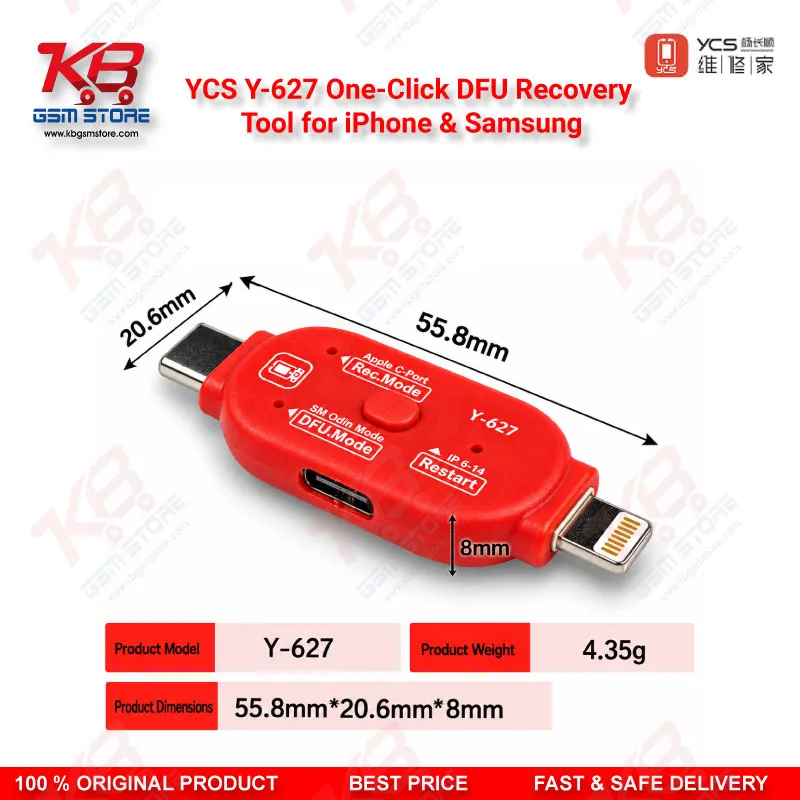
The YCS Y-627 One-Click DFU Recovery Tool for iPhone & Samsung puts an iPhone 6 to iPhone 14 series handset into DFU mode, Recovery mode, or a forced restart with one button press, and it switches Samsung phones into Odin Download mode for firmware flashing. You stop fighting button combinations and missed timing on a phone with a boot loop issue or hang on logo. A clear LED shows the selected mode, a single button cycles through functions, and a USB-C port keeps the connection simple. At just 4.35g, it sits in your tool tray beside your cables, ready for every software job your counter brings in.


SKU:MST-FLASHING-DEVICE-29

⚖️ Weight: 0.01 kg

  • Safe & Secure Payment
  • Fast Delivery
  • WhatsApp Support
View full details

Every repair shop in Pakistan knows the scene: a customer drops an iPhone on the counter with a dead after flash complaint or a boot loop issue, and you spend the next five minutes pressing volume and side buttons, counting seconds, and starting over when the Apple logo appears instead of a black DFU screen. The YCS Y-627 One-Click DFU Recovery Tool for iPhone & Samsung removes that guesswork from your repair bench. YCS built this compact unit to send a supported iPhone straight into DFU mode, Recovery mode, or a forced restart with a single press, and the same tool switches Samsung handsets into Odin mode, the Download mode that Samsung firmware flashing depends on. You pick the function with one mode button and read the active mode on the LED indicator, so a junior technician gets the same result as your most experienced hand. On the iPhone side, the Y-627 covers the iPhone 6 series through the iPhone 14 series, which still makes up most of the used and refurbished iPhone stock moving through markets in Lahore, Karachi, and Islamabad. DFU mode matters because it lets iTunes or Finder load a full firmware restore without the existing iOS starting first, which makes it the go-to route when a phone shows hang on logo, freezes in a restart loop after a failed update, or refuses to boot past a black screen. Recovery mode handles the lighter jobs, such as reinstalling iOS on a phone that still talks to the computer, and the restart function clears a frozen handset without you holding buttons that may already be worn or broken. That last point saves real time on phones that arrive with a damaged side key or a cracked volume button, because manual DFU entry becomes almost impossible on those units. On the Samsung side, the tool takes the phone into Odin Download mode so your flashing software can write stock firmware to fix software corruption, failed OTA updates, and boot loops. Reaching Download mode cleanly is the first step of that workflow, whatever box or software you run after it. The Y-627 does not replace your flashing software or your test box; it gets the phone into the correct state so those tools can do their job. Build-wise, the unit weighs only 4.35g and measures 55.8 x 20.6 x 8mm, so it fits in a drawer, a tool pouch, or a shirt pocket. The USB-C port gives you a modern, reversible connection that suits current PCs, laptops, and power sources. Before you spend time on board-level diagnosis, the Y-627 helps you separate a software problem from a hardware fault quickly. If a phone enters DFU mode and accepts a restore, you know the main boot path works and the problem sits in the firmware. If the computer never detects the phone in any mode, your next move shifts to hardware checks with a DC power supply, a multimeter, and a microscope, and possibly ISP pinout tools or eMMC programmers when a storage chip needs direct access. That makes the YCS Y-627 a natural first step in a structured diagnostic flow, and it pairs well with test boxes, USB port testers, and PCB holders already sitting on your bench. When your shop moves into deeper iOS service work, a pwned DFU board makes a logical upgrade path, but for daily restores, updates, and Samsung flashing, this one-click tool covers the routine jobs that fill most of your working day. Shop owners searching for the YCS Y-627 price in Pakistan usually want one thing: a dependable tool that saves time on every software job. KB GSM Store stocks it for technicians across Pakistan who handle iPhone and Samsung repairs daily and want fewer failed attempts, faster turnaround, and a cleaner workflow at the counter.

Key Features

  • One-press entry into iPhone DFU mode, no manual button timing needed
  • One-press Recovery mode for iOS reinstall and update jobs
  • Restart function to force-reboot frozen iPhones with worn or broken buttons
  • Samsung Odin Download mode support for Android firmware flashing
  • LED indicator that shows the selected mode at a glance
  • Single mode-switching button for quick function selection
  • USB-C port for a modern, reversible connection
  • Ultra-light 4.35g body measuring 55.8 x 20.6 x 8mm

Specifications

Brand Entity YCS
Product Entity YCS Y-627 One-Click DFU Recovery Tool
Technology Entity One-button DFU, Recovery, Restart, and Samsung Odin mode switching
Compatible Device Entities iPhone 6 to iPhone 14 series, Samsung Android phones
Repair Process Entity iOS firmware restore, Samsung firmware flashing, boot loop recovery
Industry Entity Mobile phone repair and GSM software servicing

Compatible Devices

  • iPhone 6 series
  • iPhone 7 series and iPhone 8 series
  • iPhone X, XS, and XR series
  • iPhone 11 series and iPhone 12 series
  • iPhone 13 series and iPhone 14 series
  • Samsung Android phones (Odin Download mode)

Common Repair Uses

  • Entering DFU mode to restore an iPhone with a boot loop issue or hang on logo
  • Recovery mode reinstall of iOS after a failed or interrupted update
  • Force-restarting a frozen iPhone with a damaged side or volume button
  • Putting Samsung phones into Odin Download mode before stock firmware flashing
  • Separating a software fault from a hardware fault before board-level diagnosis

FAQ

What is the product name?
The product name is YCS Y-627 One-Click DFU Recovery Tool for iPhone & Samsung.
What is the brand of this product?
The brand of this product is YCS.
What is the model of this product?
The model of this product is Y-627.
What is this product used for?
This product is used for putting iPhones into DFU mode, Recovery mode, or a forced restart with one click, and for switching Samsung phones into Odin Download mode for firmware flashing.
Which devices are compatible with this product?
This product is compatible with the iPhone 6 series through the iPhone 14 series and with Samsung Android phones in Odin mode.
Who should use this product?
This product is suitable for mobile repair technicians, repair shops, service centers, and professional users.
Can the YCS Y-627 put an iPhone 15 or iPhone 16 into DFU mode?
YCS lists iPhone support from the iPhone 6 series to the iPhone 14 series only, so do not rely on the Y-627 for iPhone 15 or newer models.
What is the difference between DFU mode and Recovery mode on the YCS Y-627?
DFU mode lets your computer restore firmware without iOS or iBoot loading first, which suits boot loop and hang on logo cases, while Recovery mode runs through iBoot and suits lighter iOS reinstall or update jobs.