Skip to product information
1 of 4
Brand: AMAOE

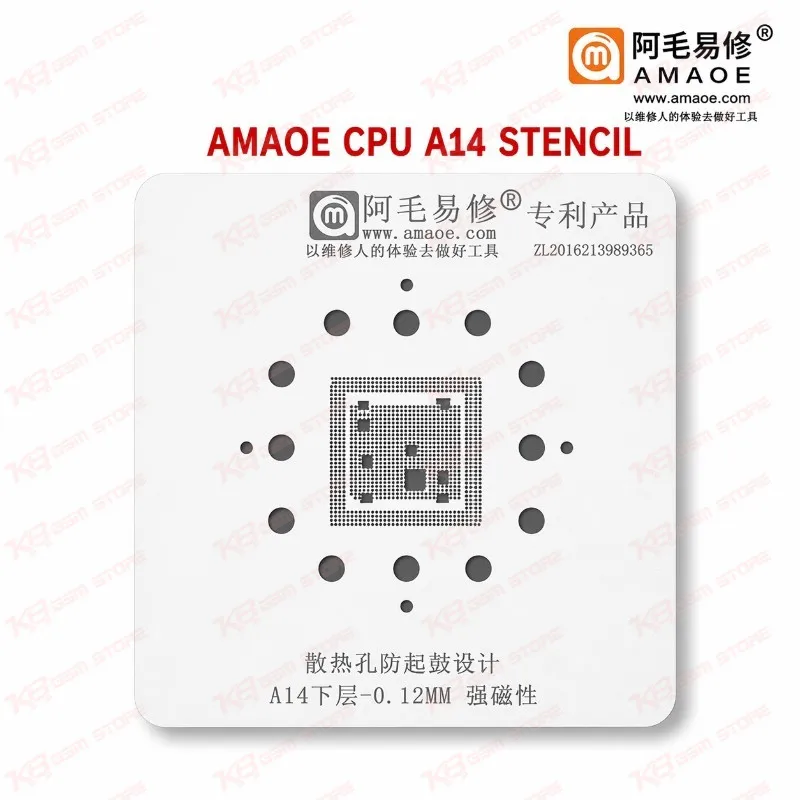
Amaoe CPU A14 Stencil

Amaoe CPU A14 Stencil

Regular price Rs.599.00 PKR
Regular price Sale price Rs.599.00 PKR
Sale Sold out
Shipping calculated at checkout.
Quantity

Amaoe CPU A14 Stencil for iPhone 12 Series CPU Reballing The Amaoe CPU A14 Stencil gives you a dedicated BGA ball pattern for reballing the Apple A14 CPU found in the iPhone 12 series. You lift the chip, clean the pads, lay the stencil over them, and print fresh solder balls in exactly the right positions. That saves you from uneven tin and poor chip seating after reflow. Pair it with your hot air station, soldering station, and microscope for clean results on dead phone, boot loop, and hang on logo jobs. KB GSM Store ships this stencil across Pakistan for technicians and repair shops.

SKU:MST-SOLDERING-TOOLS-359

⚖️ Weight: 0.15 kg

  • Safe & Secure Payment
  • Fast Delivery
  • WhatsApp Support
View full details

Description

Amaoe CPU A14 Stencil: Precise Tin Planting for iPhone 12 Series CPU Work When an iPhone 12 lands on your bench dead after a drop, or stuck in a boot loop after a failed repair, the A14 CPU often needs a proper reball once you lift it. The Amaoe CPU A14 Stencil gives you a template cut for the A14 pad layout, so you place every solder ball where it belongs instead of eyeballing it. A stencil looks like a small consumable, but it decides whether the chip sits flat and makes full contact after reflow. If you do CPU-level work regularly, this is one piece you keep within arm’s reach.Where the Amaoe CPU A14 Stencil fits in your repair workflow You reach for the Amaoe CPU A14 Stencil after the chip is off the board. First you lift the CPU with your hot air station and clean the old solder from the pads using your soldering station, flux, and braid. Then you secure the board in a PCB holder, align the stencil over the pads under your microscope, and spread solder paste across the openings with a squeegee. A short, controlled heat pass forms the balls, and you remove the stencil once everything cools slightly. Your reballed A14 then goes back on the board for reflow.This stencil sits in the reballing stage of your process, between pad cleaning and chip placement. It works with the hot air stations, soldering stations, reballing kits, PCB holders, and microscopes already on your bench. If you want faster alignment on repeat jobs, look at Amaoe’s magnetic positioning platform sets, which hold the stencil steady while you print. That platform is the natural upgrade path once your CPU reballing volume grows.Working with A14 pads: tips from the bench A14 pads are fine, so patience pays off. Preheat the board evenly before you touch the chip, and keep your hot air temperature controlled so you do not lift pads or scorch the board. Apply a thin, even layer of paste and press the stencil flat while you heat. Lift it only after the balls solidify, then check under the microscope for missing or merged balls before you place the chip. If you find a gap, fix it now. A missed ball becomes a hardware fault later.Clean the stencil with isopropyl alcohol after every job. Leftover paste and flux clog the openings and give you uneven balls on the next chip. Store it flat and dry so the mesh stays straight. Handle it by the edges, because a bent stencil ruins ball positioning no matter how steady your hands are.Why Pakistani technicians keep an Amaoe CPU A14 Stencil on the bench The iPhone 12 series keeps showing up in Pakistani repair shops with dead phone faults, charging issue complaints that trace back to board damage, and phones that hang on logo after water or impact. When the fault leads to the CPU, you want a stencil dedicated to the A14 so each job stays consistent. Buying one and reusing it across many boards costs far less than losing a motherboard to a bad reball.If you search for the Amaoe CPU A14 Stencil price in Pakistan, you will see why technicians treat it as a low-cost, high-return tool. It does not replace skill, but it removes one common source of error. Keep it with your other IC change karna tools, and you can handle A14 CPU reballing the same day the phone arrives.

Key Features

  • Dedicated stencil pattern for the Apple A14 CPU
  • Built for BGA reballing and tin planting
  • Gives consistent ball placement across repeat jobs
  • Suits iPhone 12 series motherboard repair
  • Works with hot air stations and soldering stations
  • Fits the reballing stage after pad cleaning
  • Pairs with Amaoe positioning platform sets for faster alignment
  • Compact and easy to store on your repair bench

Specifications

Brand Entity Amaoe
Product Entity Amaoe CPU A14 Stencil
Technology Entity BGA reballing, tin planting
Compatible Device Entities Apple A14 CPU, iPhone 12 series
Repair Process Entity CPU reballing, pad cleaning, reflow
Industry Entity Mobile repair, PCB repair

Compatible Devices

  • Apple A14 CPU
  • iPhone 12 series

Common Repair Uses

  • Reballing the A14 CPU after removal from the motherboard
  • Dead phone repair on iPhone 12 series boards
  • Boot loop issue and hang on logo faults that lead to CPU rework
  • IC change karna jobs involving the A14 CPU
  • Rework after drop or water damage affecting CPU solder joints

FAQ

What is the product name?
The product name is Amaoe CPU A14 Stencil.
What is the brand of this product?
The brand of this product is Amaoe.
What is the model of this product?
The model of this product is CPU A14 Stencil.
What is this product used for?
This product is used for reballing the Apple A14 CPU on iPhone 12 series motherboards.
Which devices are compatible with this product?
This product is compatible with the Apple A14 CPU used in the iPhone 12 series.
Who should use this product?
This product is suitable for mobile repair technicians, repair shops, service centers, and professional users.
Which chip does the Amaoe CPU A14 Stencil reball?
It reballs the Apple A14 CPU. Use it only for A14 work, and choose a different Amaoe stencil for other Apple chips like A13 or A15.
Can I use this stencil on a dead iPhone 12 after a failed repair?
Yes, if the fault traces to the A14 CPU and you lift the chip. Clean the pads first, reball with the stencil, then reflow the chip back on the board.

Ask any Query