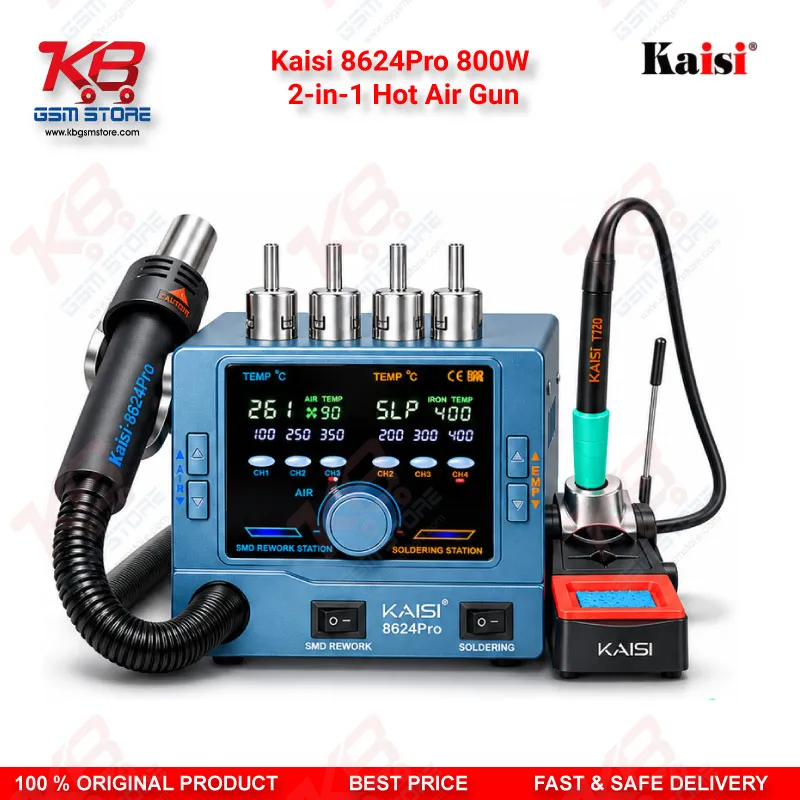
Kaisi 8624Pro 800W 2-in-1 Hot Air Gun Soldering Station
Couldn't load pickup availability
Kaisi 8624Pro 800W 2-in-1 Hot Air Gun for Mobile Board Rework
The Kaisi 8624Pro 800W 2-in-1 Hot Air Gun puts a hot air gun and a soldering iron into one compact station for your repair bench. You get dual displays, CH1 to CH3 preset channels, and a magnetic sleep mode on both handles. The station supports C115, C210, and C245 soldering handles, so you choose the tip family that suits your work. Use it for IC change karna, BGA reflow, charging IC replacement, and jumper lagana on dead phone boards. KB GSM Store supplies this station to Pakistani technicians and repair shops who want hot air and iron work in a single 4 kg unit.
SKU:MST-SOLDERING-TOOLS-1589
⚖️ Weight: 4.0 kg
- Safe & Secure Payment
- Fast Delivery
- WhatsApp Support
Share


Description
Kaisi 8624Pro 800W 2-in-1 Hot Air Gun for Daily Mobile Board Rework
Your repair bench runs out of space fast when a hot air station, a soldering station, and their stands fight for the same corner. The Kaisi 8624Pro 800W 2-in-1 Hot Air Gun solves that by putting both tools into one compact unit that measures 200 × 160 × 155 mm and weighs 4 kg. You plug in the hot air handle and the soldering iron handle, read each tool on its own display, and start work on the board in front of you. Whether the phone arrives as a dead phone, with a charging issue, or with a display problem that traces back to a bad connector, you reach for the same station every time. This page walks you through how the station fits your daily workflow, which handles and tips it supports, and where it saves you time.
How the Hot Air and Iron Channels Split Your Bench Work
The 800W hot air gun handles the jobs that need heat spread across a whole package. You lift a charging IC, remove a shield, or reflow a BGA chip with it. The soldering iron handles the fine jobs. You use it for jumper lagana on a broken trace, pad cleaning, and tacking down a flex connector. Each channel has its own display, so you read hot air temperature and air volume on one side and iron temperature on the other. You also get preset channels CH1, CH2, and CH3, so you recall a saved setting with one button press instead of dialing numbers again. That saves real time when you jump between a budget Android board and a heavily shielded flagship board every twenty minutes.
C115, C210 and C245 Handle Support
The station accepts C115, C210, and C245 soldering handles, so you pick the tip family that matches your work. C210 tips are the usual choice for fine SMD work on mobile boards, and many bundles ship with the C210 handle and one tip. C245 suits heavier jobs such as large shields and ground-heavy areas. Package contents change from seller to seller, so check whether your bundle includes the T210 or T245 handle before you order. The manual lists a hot air handle, an iron handle with stand, a power cord, and five air nozzles, and some package variants add an air gun heating core. Choose the nozzle that matches your chip size, and seat it firmly on the gun before you switch on.
Magnetic Sleep Mode and Heater Care
Both handles use a magnetic sleep mode. You place the hot air gun or the iron in its holder, and the station drops to sleep. You lift the handle, and it returns quickly to the last temperature you set. This protects the heating parts during long jobs, when you stop to test a board, read a schematic, or talk to a customer. Keep the soldering tip tinned at all times so oxidation does not build up on it. Clean the nozzle when airflow drops. If the gun shows low airflow, check for a clogged nozzle and clear the intake and exhaust vents. If a handle does not heat, confirm the connector sits fully in its front-panel port and check that the unit is not sitting in sleep mode.
Where It Fits in Your Repair Workflow
You use the Kaisi 8624Pro after diagnostics, once your multimeter or microscope points you to a hardware fault. On a dead phone with a shorted power line, you lift the suspect IC with hot air, clean the pads with the iron, and fit a fresh part. On a phone with a hang on logo issue, a weak eMMC or UFS joint can be the cause, so you reflow or reball the chip with a reballing kit and a PCB holder. After that, you connect your ISP pinout tool or eMMC programmer and test again. Some software marna jobs fail only because a chip sits loose on the board, and hot air fixes that joint before you box chalana a second time. Pair the station with a microscope and a PCB holder for clean work. When your shop volume grows and you want a dedicated hot air unit, step up to a standalone station from our Hot Air Stations category and keep this one for combined iron work.
Setup Steps and Safe Handling
Connect the hot air handle and the iron handle to their front-panel ports, fit your chosen nozzle and tip, and then power on. Keep both holders within reach so the magnetic sleep switch works as designed. Work on a heat-resistant mat, and remove the battery before you heat any board. Cover neighbouring plastic parts and small components with Kapton tape, because hot air spreads further than you expect. Lead-free solder needs a higher working temperature than leaded solder, so raise your setting in small steps and watch the board. Let the gun cool before you pack it away, and wipe the tip clean after each session. With these habits, your station stays reliable through a full day of IC change and rework jobs.
Key Features
- 800W hot air gun with a 2-in-1 design that includes a soldering iron
- Dual displays for hot air and soldering iron settings
- Hot air temperature and air volume shown on the front panel
- CH1, CH2, and CH3 preset channels to save and recall settings
- Supports C115, C210, and C245 soldering handles
- Magnetic sleep mode on both the hot air gun and the iron
- Multiple air nozzles in the package for different chip sizes
- Compact 200 × 160 × 155 mm body at 4 kg
Specifications
| Brand Entity | Kaisi |
| Product Entity | Kaisi 8624Pro 800W 2-in-1 Hot Air Gun |
| Technology Entity | Hot air rework, soldering iron, C115/C210/C245 handle support, magnetic sleep mode, preset channels |
| Compatible Device Entities | Universal — SMD and BGA boards, not device-specific |
| Repair Process Entity | IC change, BGA reflow, soldering and rework, PCB repair |
| Industry Entity | Mobile repair industry, PCB repair |
Compatible Devices
- Universal — not device-specific
- SMD components on mobile phone mainboards
- BGA chips, including CPU, eMMC, and UFS packages
Common Repair Uses
- IC change karna on dead phone boards
- Charging IC and power IC replacement for charging issue faults
- BGA reflow and reballing of eMMC and UFS chips
- Shield removal and refit during hardware fault diagnosis
- Jumper lagana on broken traces and pad repair
- Display connector and FPC resoldering for display problem faults