


Brand:
AMAOE
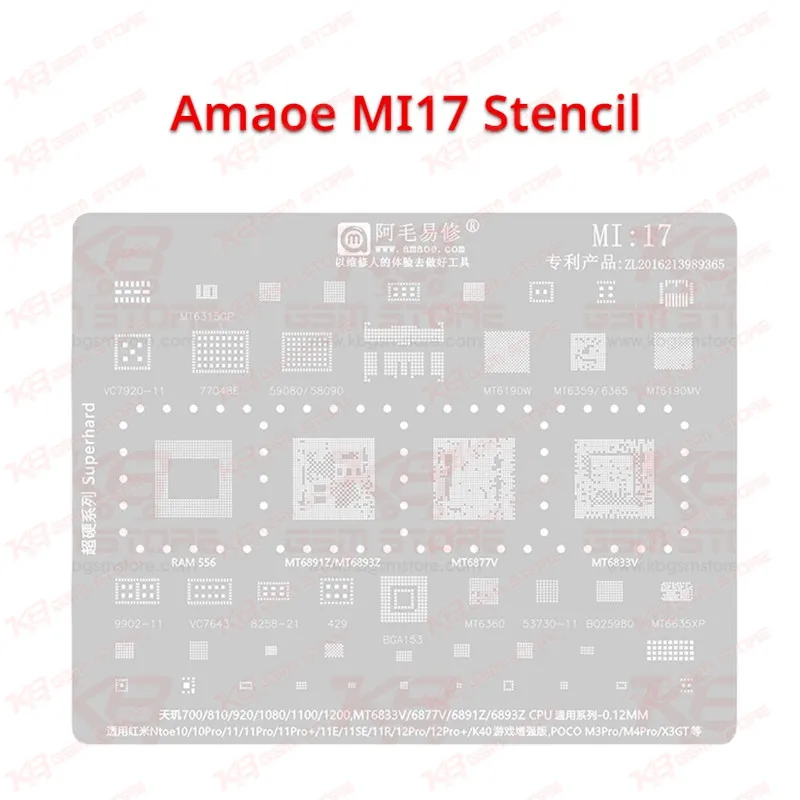
Amaoe MI17 Stencil
Amaoe MI17 Stencil
Regular price
Rs.599.00 PKR
Regular price
Sale price
Rs.599.00 PKR
Shipping calculated at checkout.
Quantity
Couldn't load pickup availability
Amaoe MI17 Stencil for Redmi Note 12 Pro MediaTek Reballing
The Amaoe MI17 Stencil is a 0.12mm BGA reballing stencil for MediaTek based Redmi and Poco boards, including the Redmi Note 12 Pro and Note 12 Pro+ with Dimensity 810, 1100, and 1200. You place it over the cleaned CPU pads, push solder paste or tin through the apertures, and reflow clean balls in one pass. One plate also covers several MediaTek power ICs, so your IC change karna jobs on dead phone, charging issue, and hang on logo faults stay organised. Check the price in Pakistan at KB GSM Store before your next repair batch.
SKU:MST-SOLDERING-TOOLS-247
⚖️ Weight: 0.09 kg
- Safe & Secure Payment
- Fast Delivery
- WhatsApp Support


Description
FAQ
What is the product name?
The product name is Amaoe MI17 Stencil.
What is the brand of this product?
The brand of this product is Amaoe.
What is the model of this product?
The model of this product is MI17 (also written MI:17).
What is this product used for?
This product is used for reballing MediaTek CPU and power ICs on Redmi and Poco boards.
Which devices are compatible with this product?
This product is compatible with Redmi Note 10 to Note 12 Pro+, Poco M3 Pro, Poco M4 Pro, and Poco X3 GT.
Who should use this product?
This product is suitable for mobile repair technicians, repair shops, service centers, and professional users.
Which MediaTek ICs does the Amaoe MI17 Stencil support?
It supports MT6891Z, MT6893Z, MT6877V, MT6833V, MT6315, MT6359, MT6365, MT6355XP, MT6190W, MT6190MV, 58090, 77048E, VC7920-11, and RAM 556.
Can I use the Amaoe MI17 Stencil on Qualcomm phones?
No. The listed ICs are MediaTek parts, so use a Qualcomm specific stencil for Snapdragon boards.