


Brand:
2UUL
2UUL PW06 Android Battery Buckle 19 in 1
2UUL PW06 Android Battery Buckle 19 in 1
Regular price
Rs.2,300.00 PKR
Regular price
Sale price
Rs.2,300.00 PKR
Shipping calculated at checkout.
Quantity
Couldn't load pickup availability
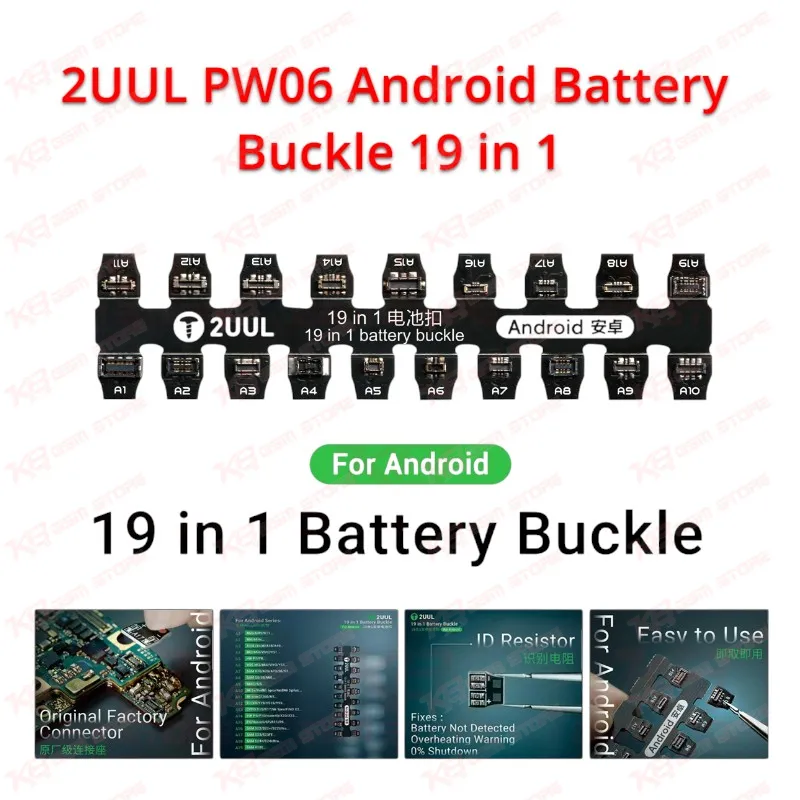
The 2UUL PW06 Android Battery Buckle 19 in 1 lets you power on an Android motherboard without a battery. The original factory-level connector fits securely, and the built-in ID resistor gives the board the battery signal it expects. That helps you diagnose battery not detected faults, overheating warnings, and 0% shutdown cases. You use one compact buckle across Samsung, Xiaomi, Redmi, Huawei, OPPO, vivo, and Honor boards instead of carrying a separate cable for each connector type. It suits dead phone checks, post-repair boot testing, and daily bench work in repair shops, service centers, and training institutes across Pakistan.
SKU:MST-SOLDERING-TOOLS-994
⚖️ Weight: 0.1 kg
- Safe & Secure Payment
- Fast Delivery
- WhatsApp Support


Description
FAQ
What is the product name?
The product name is 2UUL PW06 Android Battery Buckle 19 in 1.
What is the brand of this product?
The brand of this product is 2UUL.
What is the model of this product?
The model of this product is PW06.
What is this product used for?
This product is used for powering and booting Android phone motherboards without a battery, and for diagnosing battery not detected, overheating warning, and 0% shutdown faults.
Which devices are compatible with this product?
This product is compatible with Android phones from brands including Samsung, Xiaomi, Redmi, Huawei, OPPO, vivo, and Honor.
Who should use this product?
This product is suitable for mobile repair technicians, repair shops, service centers, and professional users.
Does the 2UUL PW06 include an ID resistor for battery detection?
Yes. The PW06 includes an ID resistor, which helps boards that expect a battery ID signal detect a battery connection during testing.
Can I boot an Android phone with the PW06 when the original battery is dead or missing?
Yes. The PW06 works as a battery-free power connection, so you can power on and test the board without the original battery.