


Airtech Battery Tag-On 11Pro/11ProMax
Airtech Battery Tag-On 11Pro/11ProMax
Regular price
Rs.399.00 PKR
Regular price
Sale price
Rs.399.00 PKR
Shipping calculated at checkout.
Quantity
Couldn't load pickup availability
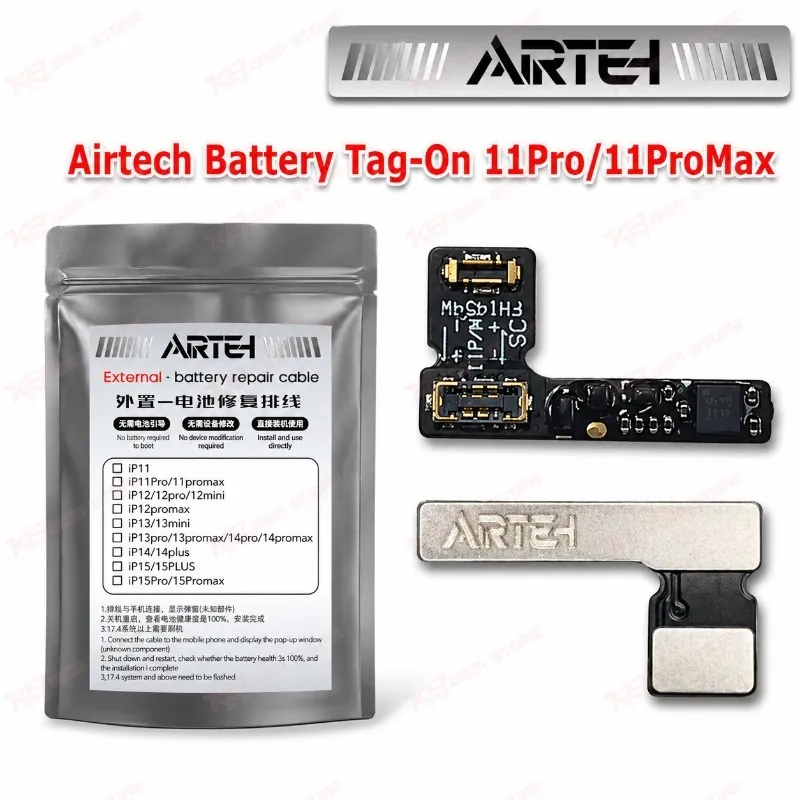
Airtech Battery Tag-On 11Pro/11ProMax for iPhone Battery Replacement Airtech Battery Tag-On 11Pro/11ProMax gives your repair bench a tag-on flex for iPhone 11 Pro and iPhone 11 Pro Max battery jobs. When you fit a bare battery cell in these phones, iOS often throws a battery health warning, so you need a flex that handles the battery data side of the job. This tag-on flex lets you pair a fresh cell with the phone without transplanting the original battery flex board. If your shop changes iPhone batteries every week, you get a practical part to keep in stock. Order it from KB GSM Store and get the iPhone 11 Pro series price in Pakistan sorted today.
SKU:MST-SOLDERING-TOOLS-1115
⚖️ Weight: 0.01 kg
- Safe & Secure Payment
- Fast Delivery
- WhatsApp Support


Description
FAQ
What is the product name?
The product name is Airtech Battery Tag-On 11Pro/11ProMax.
What is the brand of this product?
The brand of this product is Airtech.
What is the model of this product?
The model of this product is Battery Tag-On 11Pro/11ProMax.
What is this product used for?
This product is used as a tag-on battery flex when you replace the battery in an iPhone 11 Pro or iPhone 11 Pro Max.
Which devices are compatible with this product?
This product is compatible with the Apple iPhone 11 Pro and iPhone 11 Pro Max.
Who should use this product?
This product is suitable for mobile repair technicians, repair shops, service centers, and professional users.
Do I need a spot welder to use Airtech Battery Tag-On 11Pro/11ProMax with a bare battery cell?
Yes. Bare iPhone 11 series cells need spot welding, so you weld the cell tabs to the tag-on flex and test the output voltage before you close the phone.
Can I use this tag-on flex on a standard iPhone 11?
No. This listing covers the iPhone 11 Pro and iPhone 11 Pro Max. The standard iPhone 11 sells with its own tag-on flex listing, so you order that variant for that phone.