Skip to product information
1 of 4
Brand: MECHANIC

Mechanic QR12 Soldering Tip Refresher

Mechanic QR12 Soldering Tip Refresher

Regular price Rs.500.00 PKR
Regular price Sale price Rs.500.00 PKR
Sale Sold out
Shipping calculated at checkout.
Quantity

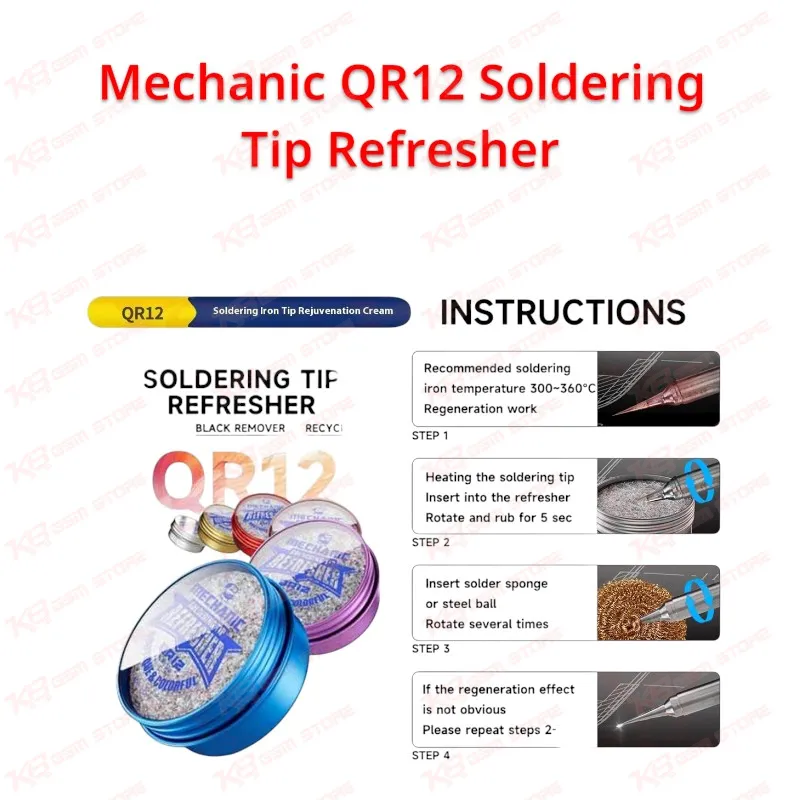
Is your iron tip black, with solder beading up and rolling off instead of spreading? The Mechanic QR12 Soldering Tip Refresher can bring that tip back into use, so you don't have to order a new one. Heat your iron to 300–360°C, push the tip into the lead-free refresher cream, and rotate it for about five seconds. Then wipe it on a damp sponge or steel wool. The black oxide comes off, fresh tin coats the surface, and heat flows into pads, jumper wires, and small SMD parts properly again. The 12g tin lasts through many sessions, which makes it a cheap daily habit for any repair bench in Pakistan.

SKU:MST-SOLDERING-ACCESSORIES-921

⚖️ Weight: 0.07 kg

  • Safe & Secure Payment
  • Fast Delivery
  • WhatsApp Support
View full details

Description

Every technician knows this moment: you touch a charging connector pin, the solder refuses to flow, and the tip sits there black and dull while the pad heats up for nothing. That black layer is oxidation, and it stops heat transfer long before the tip actually wears out. The Mechanic QR12 Soldering Tip Refresher fixes that exact problem. MECHANIC packs a lead-free refresher and tinning cream into a small 12g tin that sits right next to your soldering station. In roughly five seconds it strips oxide, dirt, and burnt flux residue off a hot tip and lays a fresh tin coat on the clean metal. Your tip goes from rejecting solder to wetting cleanly again, and you stop paying for new tips every few weeks. The method is simple and fits any bench routine. Set your iron between 300°C and 360°C, which is the range MECHANIC specifies for regeneration. Push the heated tip into the cream and rotate it while rubbing for about five seconds. Then run the tip through a damp solder sponge or a steel wool cleaner and turn it a few times. If black patches remain, repeat the dip-and-wipe cycle until the whole working face shines silver. Don't scrape or file a tip to clean it, because scraping strips the plating and ruins the tip for good. The QR12 works on the oxide layer itself and leaves the tip's working surface ready for solder. A lot of the fine work in a Pakistani repair shop depends on a properly tinned tip. Jumper work on a dead phone, where you run a thin wire across a broken track near the CPU, needs a sharp, wet tip that drops solder exactly where you point it. ISP work for an FRP lock job or a hang on logo issue means soldering thin wires onto test points before you run the box. A dirty tip lifts those pads or leaves cold joints that drop the connection in the middle of a read. Charging issue repairs, display problem fixes on connectors, network issue work around RF sections, and capacitor or resistor replacements all go faster when the tip transfers heat instantly. Otherwise you end up holding the iron on the board longer than you should. Longer dwell time puts nearby components at risk, so a clean tip directly protects the board you're working on. Lead-free solder makes oxidation worse. Lead-free alloys need higher temperatures, and higher heat speeds up oxidation, which is why tips on busy benches turn black so quickly. The QR12 uses a lead-free formula, so it fits shops that run lead-free solder wire and paste. As a tip maintenance product it isn't tied to any one phone brand or model, and it works on everyday soldering tips across your mobile repair setup. Keep the tin within reach and make a quick refresh part of your routine at the start of each day and whenever solder starts beading instead of spreading. Close the lid after every use so dust and debris stay out. The cream is reusable, so one tin keeps working across many sessions. In a full workshop setup, the QR12 belongs to the consumables layer of your soldering workflow. It supports the work you do on your soldering station alongside a hot air station for chip removal, a microscope for checking joints, a PCB holder to keep the board steady, and reballing kits when you redo BGA chips. Technicians who work with ISP pinout tools, eMMC programmers, and UFS adapters depend on clean wire soldering to make those connections. A multimeter or test box then helps you confirm the joint holds. A tip that wets properly keeps all of those jobs moving, instead of turning a simple jumper into a lifted pad and a second hardware fault. For shop owners buying in Lahore, Karachi, Islamabad, or anywhere else in Pakistan, the Mechanic QR12 costs far less than a single replacement tip. It pays for itself the first time it brings a blackened tip back into service. Keep one on every bench and your soldering stays clean, quick, and dependable from the first job of the day to the last.

Key Features

  • Removes the black oxide layer, dirt, and burnt residue from heated soldering iron tips
  • Re-tins the tip surface so solder wets and flows evenly again
  • Fast action: about 5 seconds of rotating and rubbing per refresh cycle
  • Recommended regeneration temperature of 300–360°C
  • Lead-free, environmentally friendly formula
  • Reusable cream, so one tin covers repeated refresh sessions
  • Works with a damp sponge or steel wool for the post-dip wipe
  • Compact 12g net tin fits easily on any repair bench

Specifications

Brand Entity MECHANIC
Product Entity Mechanic QR12 Soldering Tip Refresher
Technology Entity Lead-free soldering tip refresher and tinning cream (oxide removal)
Compatible Device Entities Soldering iron tips and soldering station tips (universal, not device-specific)
Repair Process Entity Soldering tip maintenance, re-tinning, jumper wire soldering, SMD rework
Industry Entity Mobile phone repair, PCB repair, electronics soldering

Compatible Devices

  • Universal, not device-specific (soldering tip maintenance product)
  • Soldering iron and soldering station tips used in mobile repair workshops
  • Tips used in lead-free solder workflows

Common Repair Uses

  • Restoring blackened, oxidized tips that no longer accept solder
  • Daily tip maintenance before jumper wire work on dead phone boards
  • Preparing tips for fine wire soldering on ISP test points
  • Resoldering charging ports and display connectors
  • SMD component replacement such as capacitors, resistors, and small ICs
  • Keeping tips clean during long lead-free soldering sessions

FAQ

What is the product name?
The product name is Mechanic QR12 Soldering Tip Refresher.
What is the brand of this product?
The brand of this product is MECHANIC.
What is the model of this product?
The model of this product is QR12.
What is this product used for?
This product is used for removing black oxide from soldering iron tips and re-tinning them so solder flows properly again.
Which devices are compatible with this product?
This product is compatible with soldering iron and soldering station tips in general. It is a universal tip maintenance product, not tied to any specific phone or device.
Who should use this product?
This product is suitable for mobile repair technicians, repair shops, service centers, and professional users.
What temperature should I set my iron to when using the Mechanic QR12?
MECHANIC recommends 300°C to 360°C for tip regeneration with the QR12. Heat the tip inside this range before you dip it into the cream.
How do I restore a black soldering tip with the Mechanic QR12?
Heat the tip to 300–360°C, insert it into the refresher, and rotate and rub it for about 5 seconds. Then wipe it on a solder sponge or steel wool and turn it a few times. If black patches remain, repeat the dip-and-wipe steps until the tip shines.