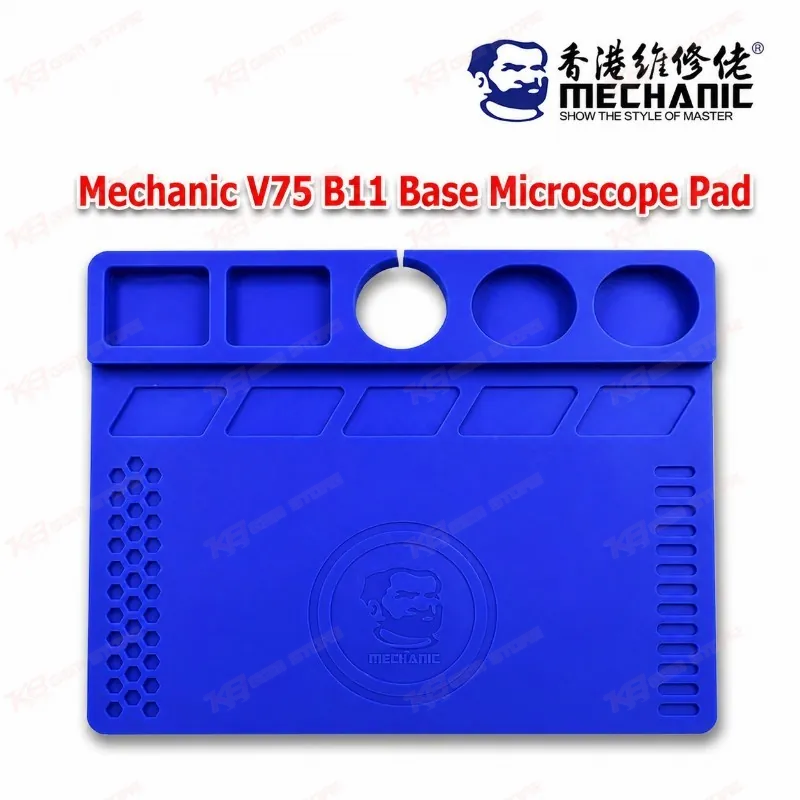
Every board-level technician knows the moment: the phone lies open under the microscope, twenty tiny screws sit scattered across a bare metal plate, and one of them rolls off the bench just when you need it. The Mechanic V75 B11 Base Microscope Pad solves that problem at the exact spot where you do your most delicate work. Mechanic builds this pad as a multi-purpose thermal insulation soldering mat for the B11 base, the column-type large plate that ships with popular Mechanic stereo microscopes such as the D75S-B11, D75T-B11, MC75S-B11, MC75T-B11, E2-B11 and E3-B11. Instead of working directly on bare metal, you get a silicone surface that resists corrosion, tolerates high temperatures, and keeps chips, screws and solder paste in place while you focus through the eyepieces. The most practical part of the design is the small screw positioning grid. Mechanic gives each grid cell its own number, so you can drop screws into a matching sequence as you take the phone apart and return each one to its original hole during reassembly. This matters more than it sounds. iPhone logic boards and many Samsung, Oppo, Vivo, Infinix and Tecno models use screws of different lengths in different positions, and a long screw in the wrong hole can crack a board layer or damage a connector, turning a simple charging issue into a dead phone. With numbered cells, your teardown order stays visible on the mat even when a customer interrupts you halfway through the job. Beyond the grid, the pad carries accessory slots that hold removed ICs, shields, connectors and small parts, along with the solder paste or flux you keep within reach for rework. The outer edge includes placement holes where you can park screwdrivers or sharp soldering iron tips, which keeps hand tools off the board area and clears space on a crowded repair bench. When you work on a board with a hang on logo fault, a network issue or a boot loop that traces back to a hardware fault, you switch between hot air, soldering iron, tweezers and multimeter probes many times in a single session, and a pad that gives every item a fixed home saves real minutes on each job. The silicone construction also suits the heat of microsoldering. When you lift a PMIC or charging IC with your hot air station, or run a jumper with a fine-tip soldering station, the mat insulates the work area and shields the B11 base underneath from flux spills and heat marks. Its anti-corrosive surface stands up to the chemicals that end up on any repair bench, so the pad stays useful through long daily use. Mechanic also shares one practical tip: if AB glue lands on the silicone, you do not need to worry, simply let the glue dry fully and then peel it off by hand. In the wider repair workflow, the Mechanic V75 B11 Base Microscope Pad sits at the center of the inspection and rework stage. You open the device, place the motherboard under the microscope, diagnose with a multimeter or DC power supply readings, and then move into IC removal, reballing or jumper work. The pad pairs naturally with PCB holders that grip the board, reballing kits and stencils for BGA chips, hot air stations and soldering stations for rework, and test boxes for checking results afterward. Software technicians who open phones for ISP work with ISP pinout tools, eMMC programmers or UFS adapters benefit too, because direct ISP connection and chip-off work both demand a clean, steady and organized microscope area. For repair shops in Lahore, Karachi, Islamabad and across Pakistan, this pad offers a low-cost upgrade that brings order to the most-used part of the bench. If your shop already runs a Mechanic microscope on the B11 base, the V75 pad gives you a dedicated working surface built for that platform rather than a generic mat sized for something else. Even if you plan to move to a larger microscope platform later, this pad covers the essential job today: keep screws sorted, keep parts safe, keep heat away from your base, and keep your attention on the board where it belongs.