Skip to product information
1 of 2

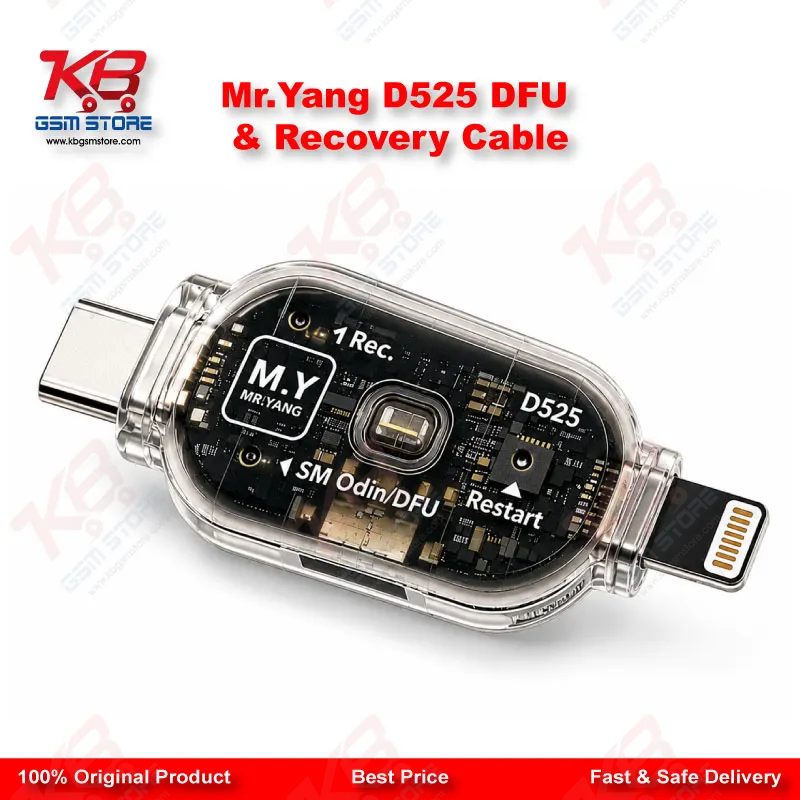
MR.YANG D525 One-Click DFU Engineering Flashing Cable for iPhone 6 to 17 Pro Max

MR.YANG D525 One-Click DFU Engineering Flashing Cable for iPhone 6 to 17 Pro Max

Regular price Rs.5,000.00 PKR
Regular price Sale price Rs.5,000.00 PKR
Sale Sold out
Shipping calculated at checkout.
Quantity

The MR.YANG D525 is a one-click DFU and recovery cable built for technicians who need fast, reliable access to Apple's DFU mode without disassembling the phone or hunting for button combinations. Covering iPhone 6 through iPhone 17 Pro Max, this engineering cable plugs straight into your flashing or unlocking software workflow, cutting the guesswork out of getting a dead phone or bricked device into a state where it can actually be recovered. Built for the repair bench, it's a straightforward addition to any technician's DFU toolkit alongside your existing flash box or programmer.

SKU:MST-FLASHING-DEVICE-24

⚖️ Weight: 0.01 kg

  • Safe & Secure Payment
  • Fast Delivery
  • WhatsApp Support
View full details

Every GSM technician knows the moment: a phone comes in dead after flash, stuck on the Apple logo, or bricked mid-update, and the first job is getting it into DFU mode reliably before any software tool can even see the device. The MR.YANG D525 exists to solve exactly that step. It is a one-click DFU engineering cable that puts the phone into DFU or recovery mode without you memorizing button-press timing sequences that change from one iPhone generation to the next. Manual DFU entry gets harder as Apple keeps shifting button layouts and timing windows across generations. What works on an iPhone 8 does not work the same way on an iPhone 13, and by the time you are dealing with a 16 or 17 series device, the margin for error on manual button presses gets tighter. The D525 removes that variable. You connect the cable, run your flashing or restore software, and the cable handles the mode entry side of the process so your attention stays on the actual repair. This matters most on boards where physical buttons are damaged, missing, or unreliable — a common scenario with water-damaged units, drop-damaged phones, or boards that have already been through a partial repair. If the volume or power button circuit is compromised, manual DFU entry becomes unreliable or impossible. A dedicated DFU cable sidesteps the button path entirely, which is often the difference between a phone that flashes cleanly and one that sits in your queue waiting for a workaround. The D525 is built around a wide compatibility range, covering iPhone 6 series devices through the iPhone 17 Pro Max. For a shop that services a mix of older iPhones still coming in for battery swaps, screen jobs, and software issues alongside the newest models customers walk in with, having one cable that spans that range simplifies your bench setup. You are not swapping between multiple generation-specific tools mid-shift. In practice, this cable earns its place in workflows around iOS restore, firmware downgrades, jailbreak preparation, unbricking after a failed update, and general system recovery where the phone needs to talk to iTunes, Finder, or a third-party flash tool in DFU state. Pair it with your existing programmer or flash box, and the D525 becomes the reliable first step that gets a locked-up or dead phone into a workable state before diagnostics even begin. For a Pakistani repair shop juggling walk-in software cases — pattern unlock jobs, FRP lock resets, hang on logo complaints, and dead-after-flash recoveries — a dependable DFU cable is one of those tools that quietly saves time on nearly every ticket that touches iOS flashing. It is not a flashy purchase, but it is one of the tools that determines whether your DFU-dependent jobs go smoothly or turn into repeated manual retries. Keep the D525 on your bench next to your ISP tools and flash box, and it becomes part of your standard triage routine: connect, enter DFU, then move into whichever software workflow the job calls for. For technicians handling volume across a wide range of iPhone generations, that consistency is the real value.

Key Features

• One-click DFU and recovery mode entry, no manual button-press sequences required
• Covers iPhone 6 series through iPhone 17 Pro Max in a single cable
• Removes dependency on functioning power or volume buttons during mode entry
• Plug-and-play connection into standard flashing and restore software workflows
• Speeds up triage on dead-after-flash and bricked-device cases
• Reduces repeated failed attempts caused by manual timing errors
• Compact engineering cable suitable for daily repair bench use
• Works alongside existing flash boxes, programmers, and ISP tools

Specifications

Brand Entity MR.YANG
Product Entity D525 One-Click DFU Engineering Cable
Technology Entity DFU mode / Recovery mode entry
Compatible Device Entities iPhone 6 series to iPhone 17 Pro Max
Repair Process Entity iOS flashing, firmware restore, unbricking
Industry Entity Mobile Repair Industry, GSM Software Repair

Compatible Devices

iPhone 6 series through iPhone 17 Pro Max (device-range compatibility, per verified listing)

Common Repair Uses

DFU mode entry for firmware flashing, iOS restore and downgrade, unbricking after failed updates, system recovery on dead-after-flash phones, jailbreak preparation, and general diagnostics workflows that require DFU or recovery mode access

FAQ

What is the product name?
The product name is the MR.YANG D525 One-Click DFU Engineering Flashing Cable.
What is the brand of this product?
The brand of this product is MR.YANG.
What is the model of this product?
The model of this product is D525.
What is this product used for?
This product is used to put iPhone devices into DFU or recovery mode with one click, ahead of firmware flashing, restore, or unbricking.
Which devices are compatible with this product?
This product is compatible with iPhone 6 series through iPhone 17 Pro Max.
Who should use this product?
This product is suitable for mobile repair technicians, GSM software technicians, repair shops, and service centers handling iPhone flashing and recovery work.
Does the D525 work on iPhones with a damaged power or volume button?
Yes, since it puts the phone into DFU mode through the cable connection rather than manual button presses, it works on units where the physical buttons are unreliable or non-functional.
Can the D525 be used for phones stuck dead after a failed flash?
Yes, entering DFU mode is the standard first step for recovering a phone that is dead after flash or stuck mid-update, and the D525 is built for that exact use case.