Skip to product information
1 of 4
Brand: QIANLI

Qianli Bumblebee Stencil (QS149)

Qianli Bumblebee Stencil (QS149)

Regular price Rs.1.00 PKR
Regular price Sale price Rs.1.00 PKR
Sale Sold out
Shipping calculated at checkout.
Quantity

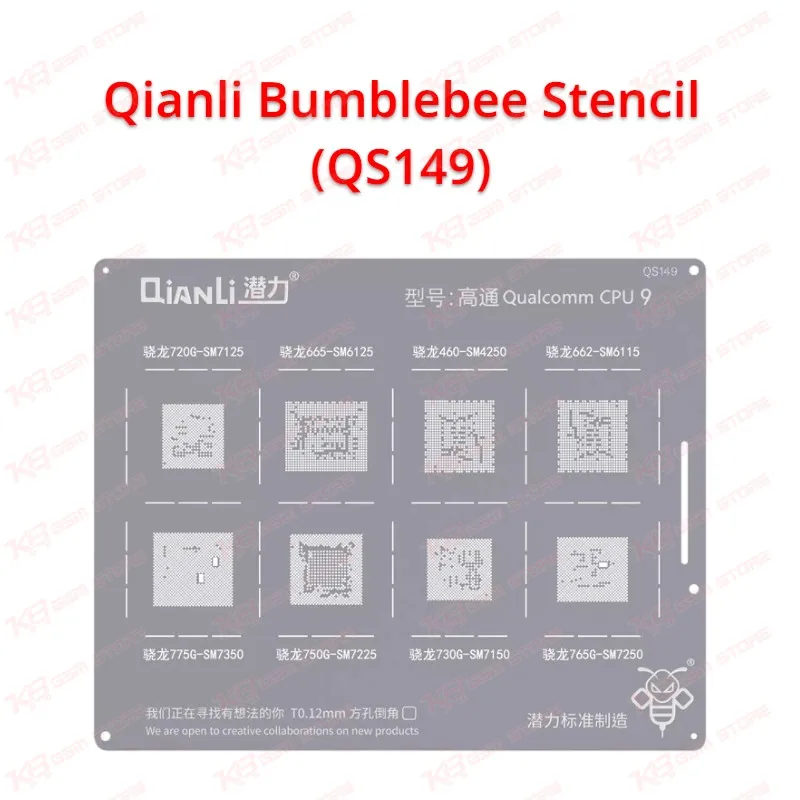
The Qianli Bumblebee Stencil (QS149) gives you a ready-made ball pattern for Qualcomm CPU reballing, so you stop guessing at ball placement after IC change karna. Qianli lists this stencil as the Qualcomm CPU 9 pattern in its Bumblebee series. You lay it over a cleaned CPU, spread paste or drop balls through the openings, and heat it down for even, repeatable results. It suits dead phone cases, hang on logo faults, and boot loop issues that trace back to a lifted or damaged CPU. Check the price in Pakistan and order the QS149 from KB GSM Store for your repair bench.

SKU:MST-SOLDERING-TOOLS-673

⚖️ Weight: 0.1 kg

  • Safe & Secure Payment
  • Fast Delivery
  • WhatsApp Support
View full details

Description

Qianli Bumblebee Stencil (QS149): Qualcomm CPU 9 Reballing Stencil for Your Repair Bench When a Qualcomm CPU comes off a board, the old balls are gone and the pads need fresh solder before it goes back on. The Qianli Bumblebee Stencil (QS149) handles that job. Qianli sells it as a replacement stencil in the Bumblebee range, labelled Qualcomm CPU 9. Every opening in the plate matches one pad position, so you get the same ball layout each time instead of hand-placing solder and hoping the spacing holds.Where the QS149 Fits in Your Workflow Reballing sits in the middle of a CPU repair. First you diagnose the fault, then lift the CPU with hot air, then clean the pads. After that you reball, and finally you place the chip back on the board and test. The QS149 covers the reballing step only. You still need flux, solder paste or balls, a hot air station, and a steady board holder. A good microscope makes the alignment check much easier. Technicians in Pakistani repair shops use stencils like this on dead phone jobs and on boards that hang on logo after a drop or a failed reflow. If a hardware fault points to the CPU itself, a clean reball is often what decides whether the board comes back to life. Using the Stencil Step by Step Start with a flat, clean CPU surface. Remove old solder with flux and braid, then wipe the pads with alcohol. Hold the chip steady, set the stencil over the pads, and align every opening to its pad under magnification. Spread solder paste across the stencil with a flat tool, or place balls into the openings if you prefer that method. Apply heat evenly until the solder melts and forms balls on the pads. Let the chip cool before you lift the stencil away. Check each ball for size and position. A missing or uneven ball means you reball again before you jumper lagana or place the chip back on the board.Matching the Pattern Before You Order The QS149 follows Qianli’s Qualcomm CPU 9 ball pattern. Qianli does not publish a public chipset-by-chipset list for it, so check your CPU’s ball map against the stencil before you buy. This one step saves you from paying for the wrong pattern. If you repair Qualcomm boards regularly, keep the QS149 beside your other Bumblebee stencils so you can grab the right plate quickly. Pair it with a hot air station for heating and a PCB holder to keep the board still. When your jobs grow into eMMC or UFS work, move up to a dedicated eMMC programmer and ISP tools that read and write storage directly.Why Technicians Pick Bumblebee Stencils A stencil cuts the part of reballing that depends most on a steady hand. You place the plate, spread the paste, and heat it once. That saves bench time and keeps your results consistent across jobs, which matters when your customers want a fast turnaround and a working phone. Shop owners also like that a replacement stencil costs far less than a failed CPU. If you want a reliable reballing stencil at a fair price in Pakistan, the Qianli Bumblebee Stencil (QS149) from KB GSM Store belongs in your toolkit.

Key Features

  • Replacement reballing stencil from the Qianli Bumblebee series
  • Qualcomm CPU 9 ball pattern for CPU reballing
  • Model code QS149 makes reordering simple
  • Fixed openings give the same ball layout every time
  • Works with solder paste or solder balls
  • Heats with a standard hot air station
  • Cuts guesswork after IC change karna
  • Fits a PCB repair workflow alongside flux, microscope, and board holder

Specifications

Brand Entity Qianli
Product Entity Qianli Bumblebee Stencil (QS149)
Technology Entity BGA reballing stencil, Bumblebee series
Compatible Device Entities Qualcomm CPU 9 pattern
Repair Process Entity CPU reballing, IC change karna, PCB rework
Industry Entity Mobile repair industry

Compatible Devices

  • Qualcomm CPU boards that match the Qianli CPU 9 ball pattern
  • Always compare your CPU’s ball map with the stencil before reballing

Common Repair Uses

  • Reballing a Qualcomm CPU after removal for a dead phone
  • Fixing hang on logo or boot loop issue linked to a lifted CPU
  • Reballing after a failed reflow or drop damage
  • Replacing a worn or damaged stencil on your repair bench

FAQ

What is the product name?
The product name is Qianli Bumblebee Stencil (QS149).
What is the brand of this product?
The brand of this product is Qianli.
What is the model of this product?
The model of this product is QS149.
What is this product used for?
This product is used for reballing Qualcomm CPUs using the Qualcomm CPU 9 ball pattern.
Which devices are compatible with this product?
This product is compatible with Qualcomm CPU boards that match the Qualcomm CPU 9 ball pattern.
Who should use this product?
This product is suitable for mobile repair technicians, repair shops, service centers, and professional users.
Which Qualcomm chipsets does the QS149 support?
Qianli lists it under Qualcomm CPU 9. Check your CPU’s ball map against the stencil before you order.
What do I need besides the QS149 to reball a Qualcomm CPU?
You need flux, solder paste or balls, a hot air station, and a steady board holder. A microscope helps you check alignment.

Ask any Query