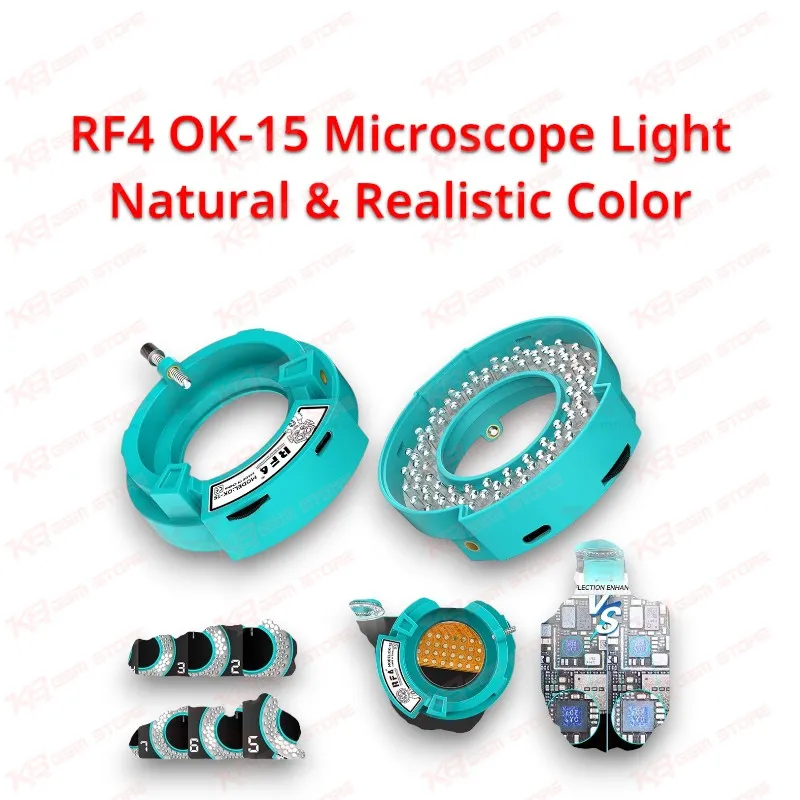
Every board-level fault you chase under a microscope depends on one thing before magnification, focus, or skill come into play: the light hitting the PCB. A burnt capacitor, a lifted pad under a PMIC, a hairline crack across a charging IC trace, or a dull cold joint on a CPU ball all look different when the light shifts toward yellow or blue, and a wrong color reading can send you down the wrong repair path on a dead phone. The RF4 OK-15 Microscope Light Natural & Realistic Color solves this at the source with a 5800K natural light color temperature that sits close to daylight, so copper, solder, flux, underfill, and component markings show their true tones through your eyepieces or on your microscope camera display. Realistic color rendering matters most when you compare healthy and damaged areas side by side, for example when you inspect corrosion around a water-damaged network section or check whether underfill still covers the edges of an eMMC or UFS chip after a hot air job. RF4 splits the lamp beads on the OK-15 into separate zones that you control independently, so you can light the board from one side, from several angles, or from the full ring depending on the job. Single-side lighting throws low shadows that reveal raised solder bridges, bent shields, and missing SMD parts, while full-ring lighting flattens the scene so you can read tiny IC codes without guesswork. This zone switching removes the blind spots that fixed ring lights leave behind tall capacitors, shielding frames, and connector housings, a common headache around the crowded PMIC and audio IC areas of Samsung, Oppo, Vivo, Infinix, Tecno, and iPhone logic boards. The light offers multiple brightness levels, and its smart zone-based compensation keeps illumination uniform across the field of view, so the edges of the image never fade into darkness while the center burns out. Even lighting helps your microscope camera too, because a balanced frame gives cleaner captures when you record jobs for customers or train juniors in your shop. RF4 also built the OK-15 to cut reflections, a practical benefit when you inspect polished shields, fresh solder, and glossy chip packages that usually bounce harsh hotspots straight back into the lens. Installation takes about a second: the snap-on mount locks around your microscope with a simple twist, and RF4 lists it as compatible with most microscopes, so you upgrade the stereo microscope already on your bench instead of replacing the whole setup. Picture a typical Pakistani repair job. A customer brings a phone with a charging issue, a hang on logo problem, or no power at all after a fall. You clamp the board in a PCB holder, check current draw on a DC power supply, and use a multimeter to narrow down the short. Once the fault points to a specific area, the microscope takes over, and the OK-15 decides how clearly you see it. During chip removal with your hot air station, neutral daylight lets you watch solder turn shiny and reflow before you lift the IC, which protects nearby parts from overheating. During cleanup with your soldering station and wick, it exposes leftover flux and bridged pads that a warm-tinted lamp hides. During CPU reballing with a reballing kit, it helps you judge ball size and stencil alignment before you commit heat, and after a jumper wire repair it confirms that the enamel wire sits cleanly on the correct pad. Long bench hours also wear down your eyes, and the eye-friendly 5800K output keeps extended micro-soldering sessions comfortable, a real advantage for technicians who run full days of board work in Lahore, Karachi, and Islamabad service centers. For shop owners, the OK-15 offers a direct way to lift the output of existing microscopes, and it pairs naturally with hot air stations, soldering stations, reballing kits, PCB holders, and test boxes. If your current binocular or trinocular repair microscope struggles with shadows, yellow tint, or glare, this accessory fixes those exact pain points without software, setup, or a learning curve.