


Brand:
YCS
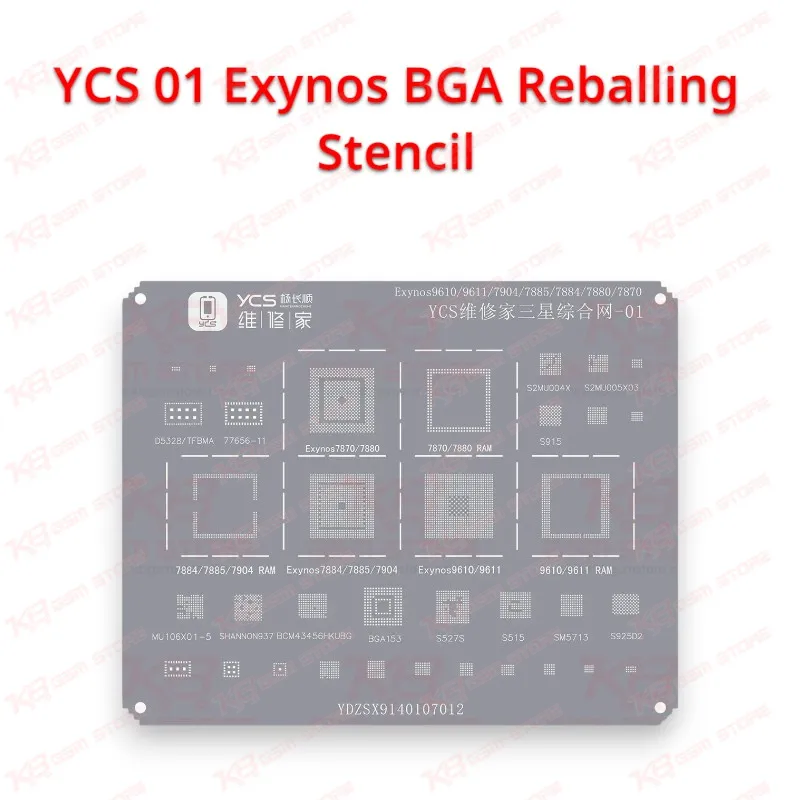
YCS 01 Exynos BGA Reballing Stencil
YCS 01 Exynos BGA Reballing Stencil
Regular price
Rs.600.00 PKR
Regular price
Sale price
Rs.600.00 PKR
Shipping calculated at checkout.
Quantity
Couldn't load pickup availability
Exynos CPU Reballing Stencil for Samsung Board Repair
The YCS 01 Exynos BGA Reballing Stencil gives you a chip-specific template for rebuilding solder balls on Samsung Exynos CPUs during board-level repair. When a dead phone, boot loop issue, or hang on logo fault traces back to cracked CPU joints, a proper reball gives you a longer-lasting fix than another quick reflow. The aperture pattern follows the Exynos package layout, so solder paste lands only where the pads sit and you avoid bridged or missing balls. Pair it with your hot air station, flux, solder paste, and microscope for clean, repeatable CPU work on your repair bench.
SKU:MST-SOLDERING-TOOLS-975
⚖️ Weight: 0.01 kg
- Safe & Secure Payment
- Fast Delivery
- WhatsApp Support


Description
FAQ
What is the product name?
The product name is YCS 01 Exynos BGA Reballing Stencil.
What is the brand of this product?
The brand of this product is YCS.
What is the model of this product?
The model of this product is 01.
What is this product used for?
This product is used for reballing Samsung Exynos CPUs during board-level mobile repair.
Which devices are compatible with this product?
This product is compatible with Samsung Exynos series CPUs that match the chip layout on the stencil.
Who should use this product?
This product is suitable for mobile repair technicians, repair shops, service centers, and professional users.
Can I use the YCS 01 stencil on Snapdragon variants of Samsung phones?
No. Snapdragon CPUs use a different ball layout, so the YCS 01 suits Exynos packages only. Use a Qualcomm-specific stencil for Snapdragon boards.
How do I stop solder balls from merging during Exynos CPU reballing?
Clean the pads completely, fill every aperture evenly, hold the stencil flat, keep low airflow moving in circles, and let the chip cool before you lift the stencil.