


Brand:
YCS
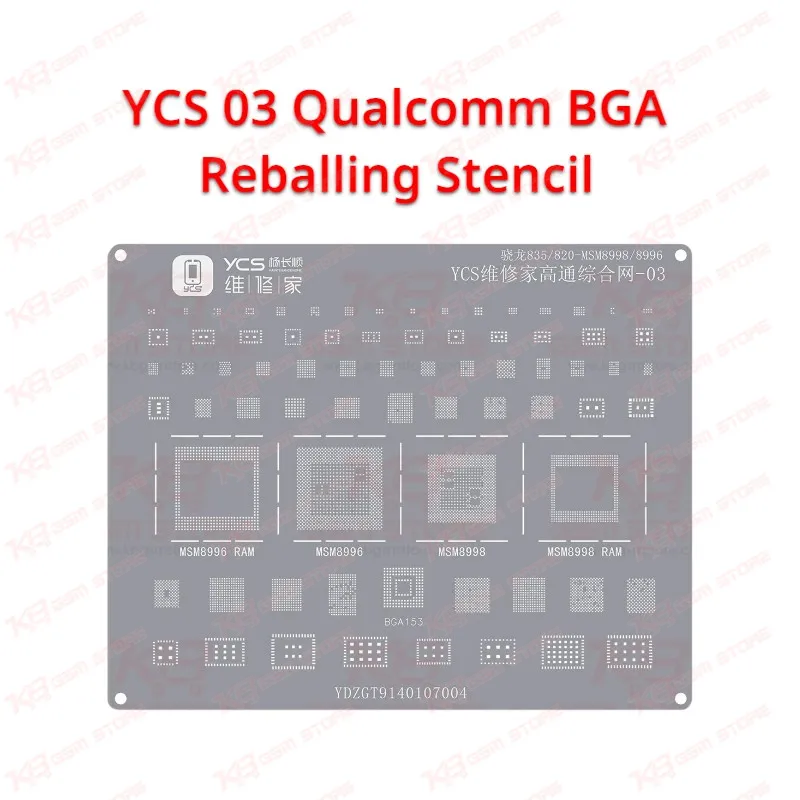
YCS 03 Qualcomm BGA Reballing Stencil
YCS 03 Qualcomm BGA Reballing Stencil
Regular price
Rs.600.00 PKR
Regular price
Sale price
Rs.600.00 PKR
Shipping calculated at checkout.
Quantity
Couldn't load pickup availability
YCS 03 Qualcomm Stencil for Snapdragon CPU Reballing
The YCS 03 Qualcomm BGA Reballing Stencil gives your bench a dedicated steel template for rebuilding solder balls on Qualcomm Snapdragon CPUs once you lift them off the board. When a dead phone, boot loop issue, or hang on logo fault traces back to a cracked CPU joint, you need even, correctly sized balls before you seat the chip again. This YCS Repairer stencil belongs to the YCS Qualcomm CPU series and sits on the YCS magnetic U-Platform, so your chip stays locked in place while you spread paste and apply heat. Match the stencil pattern with the code on your CPU before you start.
SKU:MST-SOLDERING-TOOLS-1019
⚖️ Weight: 0.01 kg
- Safe & Secure Payment
- Fast Delivery
- WhatsApp Support


Description
FAQ
What is the product name?
The product name is YCS 03 Qualcomm BGA Reballing Stencil.
What is the brand of this product?
The brand of this product is YCS Repairer.
What is the model of this product?
The model of this product is YCS 03.
What is this product used for?
This product is used for reballing Qualcomm Snapdragon CPUs during board-level mobile phone repair.
Which devices are compatible with this product?
This product is compatible with the Qualcomm Snapdragon CPUs in the YCS 03 pattern group and the Android phones that use them; always match the CPU code before reballing.
Who should use this product?
This product is suitable for mobile repair technicians, repair shops, service centers, and professional users.
Can I use the YCS 03 stencil with solder paste instead of loose solder balls?
Yes. Lock the CPU and stencil on the platform, spread solder paste across the holes with a scraper, remove the excess, and heat with hot air until each hole forms a round ball.
Does the YCS 03 Qualcomm stencil fit the YCS magnetic U-Platform?
Yes. YCS designs its CPU stencil series for the YCS Repairer U-Platform, which clamps the chip and holds the stencil steady for accurate alignment.