Skip to product information
1 of 5
Brand: YCS

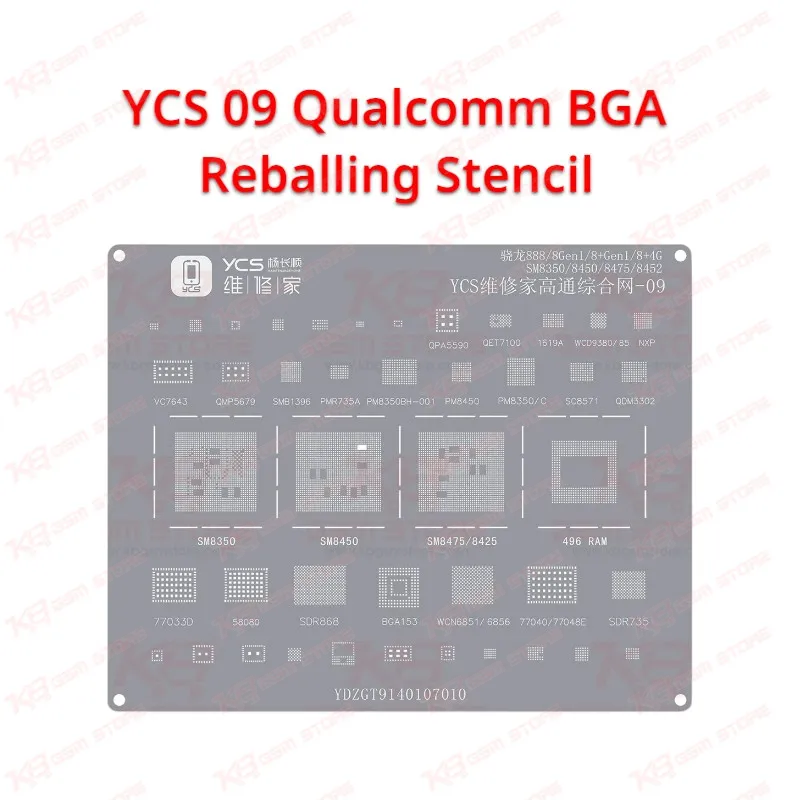
YCS 09 Qualcomm BGA Reballing Stencil

YCS 09 Qualcomm BGA Reballing Stencil

Regular price Rs.600.00 PKR
Regular price Sale price Rs.600.00 PKR
Sale Sold out
Shipping calculated at checkout.
Quantity

YCS 09 Qualcomm Stencil for Snapdragon CPU Reballing
The YCS 09 Qualcomm BGA Reballing Stencil gives your repair bench a dedicated steel mesh for putting a fresh ball grid back on Qualcomm Snapdragon CPUs. It belongs to the numbered YCS Repairer Qualcomm stencil series, so you buy the single sheet your current job needs instead of paying for a full kit. Use it with solder paste or solder balls when a dead phone, boot loop issue, or hang on logo fault traces back to a cracked CPU joint. It works alongside the YCS U-Platform, your hot air station, and a microscope for clean, even balls on every Snapdragon rework job.

SKU:MST-SOLDERING-TOOLS-1025

⚖️ Weight: 0.01 kg

  • Safe & Secure Payment
  • Fast Delivery
  • WhatsApp Support
View full details

Description

A Snapdragon CPU that lifts during a board-level job leaves you with a chip that has lost half its balls and a board that will not boot until you reball it properly, and the YCS 09 Qualcomm BGA Reballing Stencil gives you a dedicated steel mesh for exactly that bench task. YCS Repairer builds its Qualcomm CPU stencils as a numbered series and sells them in 24-piece and 41-piece sets, and number 09 is one sheet from that lineup, so you can pick up the exact stencil your job needs without buying the whole kit. Technicians across Pakistan reach for a CPU stencil when a dead phone comes in after a drop, when a boot loop issue traces back to a cracked CPU joint, or when a phone hangs on logo after another shop tried a quick hot air reflow and left the chip half-soldered. In every one of these cases you need to lift the CPU, clear the old solder from both the chip and the board pads, and build a fresh, even ball grid on the chip before you seat it again, and a chip-specific stencil makes that last step predictable. Start the job on your PCB holder, lift the Snapdragon with your hot air station and plenty of flux, then clean the chip with solder wick and a fine soldering tip until every pad sits flat and bright. Match the marking on the CPU against the chip markings on the YCS 09 sheet, place the stencil over the chip, and confirm under your microscope that every aperture lines up with a pad before you load any solder. Most Pakistani benches work one of two ways. You can wipe solder paste across the apertures with a scraper blade, or you can roll pre-sized solder balls into the holes over a thin coat of flux, and the steel mesh handles both methods. Heat the paste or balls with gentle hot air until each ball forms and turns shiny, let the stencil cool fully, and lift it straight up so the new balls stay on the chip instead of pulling away with the sheet. YCS sells its CPU stencils alongside the YCS Repairer U-Platform, a magnetic synthetic-stone reballing base that clamps the chip firmly and resists heat and cleaning chemicals, and that pairing pays off on a busy bench because a CPU that shifts by a fraction of a millimetre while you load paste gives you merged balls and another round of cleaning. A clean reballing job depends on more than the stencil, so keep the supporting tools ready before you start: a hot air station with controllable airflow, a soldering station with a fine tip for pad cleaning, good flux, solder wick, solder paste or correctly sized solder balls, a PCB holder to keep the board steady, and a microscope to inspect alignment and ball shape. Keep a multimeter close by and check the board for shorted lines before you put a freshly reballed CPU back in place, because a perfect ball grid will not fix a hardware fault that sits somewhere else on the board, such as a dead power rail behind a charging issue or a damaged RF section behind a network issue. When your Qualcomm workload grows past the occasional CPU job, the natural upgrade is the full YCS Qualcomm 24-piece or 41-piece stencil set together with the U-Platform, which keeps a matched mesh on your bench for many more Snapdragon packages. After each job, soak the stencil in flux cleaner or isopropyl alcohol, brush the apertures gently with a soft ESD brush, and dry it flat, because blocked holes and a bent mesh give you missing or uneven balls on the next chip. Store it flat and away from heavier hand tools so the sheet stays straight for the next job. KB GSM Store stocks the YCS 09 Qualcomm BGA Reballing Stencil for repair shops in Lahore, Karachi, Islamabad, and every other city in Pakistan, along with the hot air stations, soldering stations, reballing kits, PCB holders, and microscopes that complete a CPU rework bench, so you can order the stencil and its supporting tools together and get back to clearing your queue of Qualcomm board jobs.

Key Features

  • Dedicated aperture layout for Qualcomm Snapdragon CPU reballing
  • Stencil number 09 from the YCS Repairer Qualcomm CPU stencil series
  • Sold as a single sheet, so you buy only the stencil your job needs
  • Steel mesh construction suited to repeated hot air reballing work
  • Works with both solder paste and pre-sized solder ball methods
  • Pairs with the YCS Repairer U-Platform magnetic reballing base
  • Reusable after cleaning with flux cleaner or isopropyl alcohol
  • Flat, compact sheet that stores easily in a stencil organizer

Specifications

Brand Entity YCS (YCS Repairer)
Product Entity YCS 09 Qualcomm BGA Reballing Stencil
Technology Entity BGA reballing, tin planting steel mesh
Compatible Device Entities Qualcomm Snapdragon CPUs, Qualcomm-based Android smartphones
Repair Process Entity CPU removal, pad cleaning, BGA reballing, CPU resoldering
Industry Entity Mobile phone repair, PCB board-level repair, micro-soldering

Compatible Devices

  • Qualcomm Snapdragon CPU packages that match the YCS 09 aperture layout
  • Android smartphones built on a Qualcomm Snapdragon CPU that matches the YCS 09 layout
  • Confirm the exact chip by matching the CPU marking against the markings on the stencil sheet

Common Repair Uses

  • Reballing a Snapdragon CPU after removal from a dropped or water-damaged board
  • Fixing a dead phone caused by cracked solder joints under the CPU
  • Repairing a boot loop issue or hang on logo fault traced to a poorly soldered CPU
  • Redoing a failed CPU reflow left by a previous repair attempt
  • Reballing a donor Snapdragon CPU before transplanting it to another board

FAQ

What is the product name?
The product name is YCS 09 Qualcomm BGA Reballing Stencil.
What is the brand of this product?
The brand of this product is YCS (YCS Repairer).
What is the model of this product?
The model of this product is 09 from the YCS Qualcomm CPU stencil series.
What is this product used for?
This product is used for reballing Qualcomm Snapdragon CPUs during board-level mobile phone repair.
Which devices are compatible with this product?
This product is compatible with Qualcomm Snapdragon CPU packages that match the YCS 09 aperture layout.
Who should use this product?
This product is suitable for mobile repair technicians, repair shops, service centers, and professional users.
Can I use the YCS 09 Qualcomm BGA Reballing Stencil with solder paste instead of solder balls?
Yes. You can wipe solder paste across the apertures with a scraper blade or roll pre-sized solder balls into the holes over flux, then heat with hot air and lift the stencil only after it cools fully.
How do I confirm the YCS 09 stencil fits my Qualcomm CPU before reballing?
Match the marking on the CPU against the chip markings on the stencil, place the cleaned chip under the sheet, and check under a microscope that every aperture sits exactly over a pad before you load solder.

Ask any Query