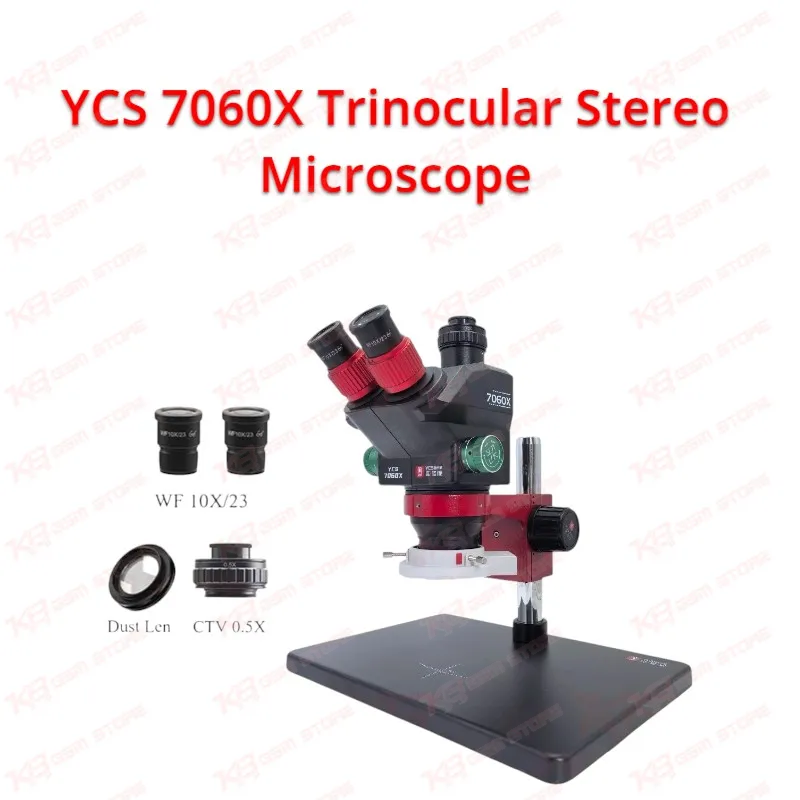
When a customer drops a dead phone on your counter, the fault usually hides somewhere your bare eyes cannot reach: a cracked solder ball under the PMIC, a burnt filter near the charging connector, or a tiny short on the main power line. The YCS 7060X Trinocular Stereo Microscope brings those faults into clear view with a 7X to 60X continuous zoom, built on a 0.7X to 6.0X zoom objective and a pair of WF10X/23 eyepieces. You get true stereo depth through both eyes, and that depth matters when you guide tweezers, a soldering tip, or a hot air nozzle by hand. Pakistani repair shops that handle charging issues, network issues, display problems, and hang on logo cases every day need optics that stay sharp at low and high power alike, and this unit covers the full range from whole-board inspection to single-pad detail.
Start at 7X to scan the entire motherboard for corrosion, missing components, and heat damage after a failed rework. Turn the zoom toward 60X and you can read component markings, check the solder fillet on a tiny resistor, or inspect the pins of a charging IC before you reflow it. The zoom changes continuously instead of jumping in fixed steps, and a fine-tuning knob lets you settle on the exact magnification your job needs. The high-eyepoint wide-angle eyepieces give you a large field of view, and the anti-reflective coated lenses with high light transmission keep edges crisp and colors natural. Both eyepieces adjust independently, so you can correct for a difference between your left and right eye and keep the image sharp in both tubes. That comfort pays off during long shifts when the repair queue keeps growing.
The third optical port turns the YCS 7060X Trinocular Stereo Microscope into a teaching and documentation tool. Mount a C-mount HDMI or 4K microscope camera on the included CTV 0.5X adapter and you can watch the board on a monitor while you work, record the repair for a customer, or let a trainee follow every step of an IC replacement without crowding your chair. Technical training institutes and service centers favor this setup because the whole team sees the same image at the same time. The 0.5X reduction lens matches the camera sensor to a wider working area, so the monitor shows a practical view of the board instead of a narrow crop. You keep the binocular view for precise hand control and use the screen for sharing, which suits shops that post repair videos or explain a hardware fault to a walk-in customer.
The LED light panel gives you adjustable brightness, so you can run soft light over reflective shields and stronger light over dark, flux-covered areas around a CPU. Even illumination helps you spot hairline cracks, lifted pads, and bridged pins before they turn into a comeback job. The large aluminum alloy base and column hold the head steady, and you notice that stability the moment you start jumper work under high zoom, where even slight vibration throws the image off. The package includes the main unit, main unit bracket, column, base, LED light plate, CTV 0.5X adapter, two high-eyepoint WF10X/23 eyepieces, two rubber eye rings, a dust cover, and a limiter, so you can assemble the microscope and put it to work the same day.
On the bench, the microscope sits at the center of nearly every board-level job. During diagnostics, you pair it with a multimeter and a DC power supply: the meter finds the shorted line, and the microscope shows you exactly which capacitor or filter has failed. During BGA work, you watch the solder melt under your hot air station, confirm the chip seats evenly, and inspect the pads after removal before you reach for your reballing kit and stencils. For fine soldering, it lets you run jumper wires across broken traces, rebuild ripped pads, and clean bridges left by a soldering station tip. When you prepare a board for ISP or eMMC/UFS work, the microscope helps you locate test points and solder thin wires to them cleanly, which lowers the risk of lifting a pad on a phone that is already dead after flash.
To get the most from the YCS 7060X Trinocular Stereo Microscope, clamp your board in a PCB holder so it stays flat and parallel to the objective, and set the eyepiece spacing to match your eyes before you start. Focus at the highest zoom first, then zoom out, which is the standard way to set up a stereo zoom microscope for consistent sharpness across the range. Keep the dust cover on whenever the microscope sits idle, because flux smoke and solder fumes leave a film on optics over time. Shops that want more reach over large tablet boards or a cleaner bench can move to the YCS swing arm stand, which the manufacturer designs to work with this model and which forms the natural upgrade path once your workload grows. Add an HDMI microscope camera next and you get a complete inspection station without replacing the optics.
For repair shop owners in Lahore, Karachi, Islamabad, and across Pakistan, this microscope makes sense when you have outgrown a basic binocular unit and need camera output without giving up stereo vision. It suits technicians who handle CPU and PMIC replacement, charging IC changes, backlight and display line repair, and network section work on iPhone, Samsung, Xiaomi, Oppo, Vivo, and Infinix boards. KB GSM Store stocks it alongside soldering stations, hot air stations, reballing kits, multimeters, and PCB holders, so you can build a full micro-soldering bench from one place and keep every tool in the same workflow.