


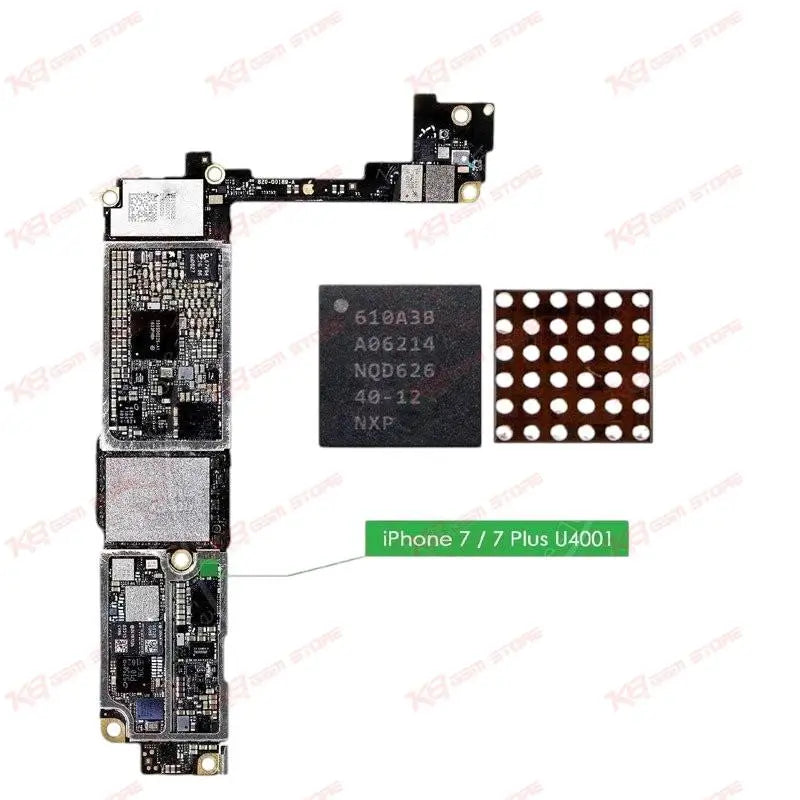
A3B U2 610A3B Charging Power IC iPhone 7, 7+
A3B U2 610A3B Charging Power IC iPhone 7, 7+
Regular price
Rs.300.00 PKR
Regular price
Rs.400.00 PKR
Sale price
Rs.300.00 PKR
Shipping calculated at checkout.
Quantity
Couldn't load pickup availability
The A3B U2 610A3B is the Tristar charging and USB logic IC used inside iPhone 7 and iPhone 7 Plus. Also known as U4001, this 36-pin BGA chip controls charging current, manages data communication with the lightning port, and handles power negotiation with the battery and PMU. When a phone stops charging after a new battery or charging port, this IC is usually the real fault. Technicians use it for board-level repair, IC reballing, and dead-charging diagnosis. Genuine spec-matched replacement for reliable charging restoration on iPhone 7 series boards.
⚖️ Weight: 0.01 kg
SKU:MST-IC-2
- Safe & Secure Payment
- Fast Delivery
- WhatsApp Support


Description
FAQ
What is the product name?
The product name is A3B U2 610A3B Charging IC for iPhone 7 & 7 Plus.
What is the brand of this product?
This IC is an NXP-manufactured component used as original equipment inside Apple iPhone boards.
What is the model of this product?
The model is 610A3B, also labeled U4001 on the board schematic.
What is this product used for?
This IC controls charging current and USB data communication on the iPhone 7 and iPhone 7 Plus logic board.
Which devices are compatible with this product?
This IC is compatible with iPhone 7 and iPhone 7 Plus.
Who should use this product?
This product is suitable for mobile repair technicians, repair shops, service centers, and professional users.
Does this IC fix a phone that charges but isn't detected by iTunes?
Yes, since U2 also routes USB data lines, a faulty chip can cause charging without computer detection, and replacing it resolves both symptoms together.
Can this IC be reballed with a standard 0.3mm ball kit?
Yes, the 36-pin BGA package accepts standard 0.3mm ball reballing using a matching stencil for this footprint.